WordPress accessibility checker
Find and fix accessibility issues in WordPress — without an overlay
Lumtera checks every post, page and product against 69 WCAG 2.2 checks while you write, then checks the rendered page, keyboard included. It explains each problem in plain words, and the fixes you approve go into your content, with undo.
Try it live runs the free plugin on a temporary demo site in your browser, using WordPress Playground. It can take a minute to load, and nothing is installed on your own site.
- Every check stays free, no page limits
- No account or API key
- No overlay or visitor widget
Updated for Lumtera 1.2.2 and Lumtera Pro 1.1.1.
Captions are on. Nothing loads from YouTube until you press play.
Works where you already build
- Block editor
- Classic editor
- Elementor
- Beaver Builder
- Divi
- Bricks
- WooCommerce
- ACF
- Kadence Blocks
- Spectra
- WP-CLI
- Multisite
What we can show you
- 98% of failing examples found at any severity, on the 21 W3C ACT rules our checks cover Method and gaps of the accuracy benchmark
- 37 of 55 WCAG 2.2 A and AA criteria that the free checks look at, fully or in part — and the rest listed as manual tests See which criteria are covered
- Real samples A client report, an evidence pack and a VPAT 2.5 ACR made by Lumtera Pro on a demo site Open the samples
In short
What is Lumtera?
Lumtera is a free accessibility checker plugin for WordPress. It checks your posts, pages and products against 69 WCAG 2.2 A and AA checks as you write, and the page your theme renders with 33 whole-page checks and a keyboard walk, then explains each problem and how to fix it.
It is not an overlay: nothing is added for visitors, and fixes go into your content only after you approve them, with undo. Lumtera Pro is a paid add-on for checking many pages on a schedule and for proving the work, with form tests, an evidence log, client reports and a VPAT 2.5 conformance report.
No tool makes a site compliant on its own: automated checks find some barriers, not all, and Lumtera says which criteria still need a person.
- Latest version
-
Lumtera 1.2.2, October 2, 2026
Lumtera Pro 1.1.1, October 2, 2026 Changelog - Price
- Free, with no page limits. Lumtera Pro from $96.85 a year. Pricing
- Where to get it
- The WordPress.org plugin directory, or the "Download free" buttons here. Lumtera on WordPress.org
- Standard
- WCAG 2.2 A and AA. The ADA Title II rule, the European Accessibility Act (EAA, through EN 301 549) and Section 508 all point to WCAG.
- Requires
- WordPress 6.6 or newer and PHP 8.1 or newer. Block editor, classic editor, Elementor and other page builders, multisite.
- Made by
- MantraBrain. The free plugin is open source, under the GPL.
The problem
95.9% of the web's most popular home pages have accessibility errors a machine can find
And they are nearly always the same few problems — most of them typed into the content one post at a time. Lumtera catches every one of these:
- 83.9% of home pages have low-contrast text Lumtera check: Text color has low contrast
- 53.1% of home pages have missing image alt text Lumtera check: Image has no alternative text
- 51.0% of home pages have form fields without labels Lumtera check: Form field has no label
- 46.3% of home pages have empty links Lumtera check: Link has no text
- 30.6% of home pages have empty buttons Lumtera check: Button has no text
- 13.5% of home pages have missing page language Lumtera check: Page language is missing or not valid
Source: WebAIM Million 2026 — an average of 56.1 detectable errors per home page.
Not an overlay
Accessibility is fixed in the content, not bolted on afterwards
Overlay widgets promise to make a site accessible with one line of JavaScript. A script cannot know what your photo shows, how your page is organized or what a vague link is for — and in 2025 the US Federal Trade Commission ordered one overlay vendor to pay $1 million over exactly that claim.
-
An overlay
patches pages in each visitor's browser, adds a toolbar and a third-party script, and can clash with the assistive technology people already use.
-
Lumtera
helps you fix the saved content itself, so the fix works for every visitor, device and screen reader. No widget, no toolbar, no script rewriting pages; optional fixes for theme problems are plain HTML and CSS from your server, off by default.
How it works
Accessibility becomes part of writing, not a separate project
-
Write as usual
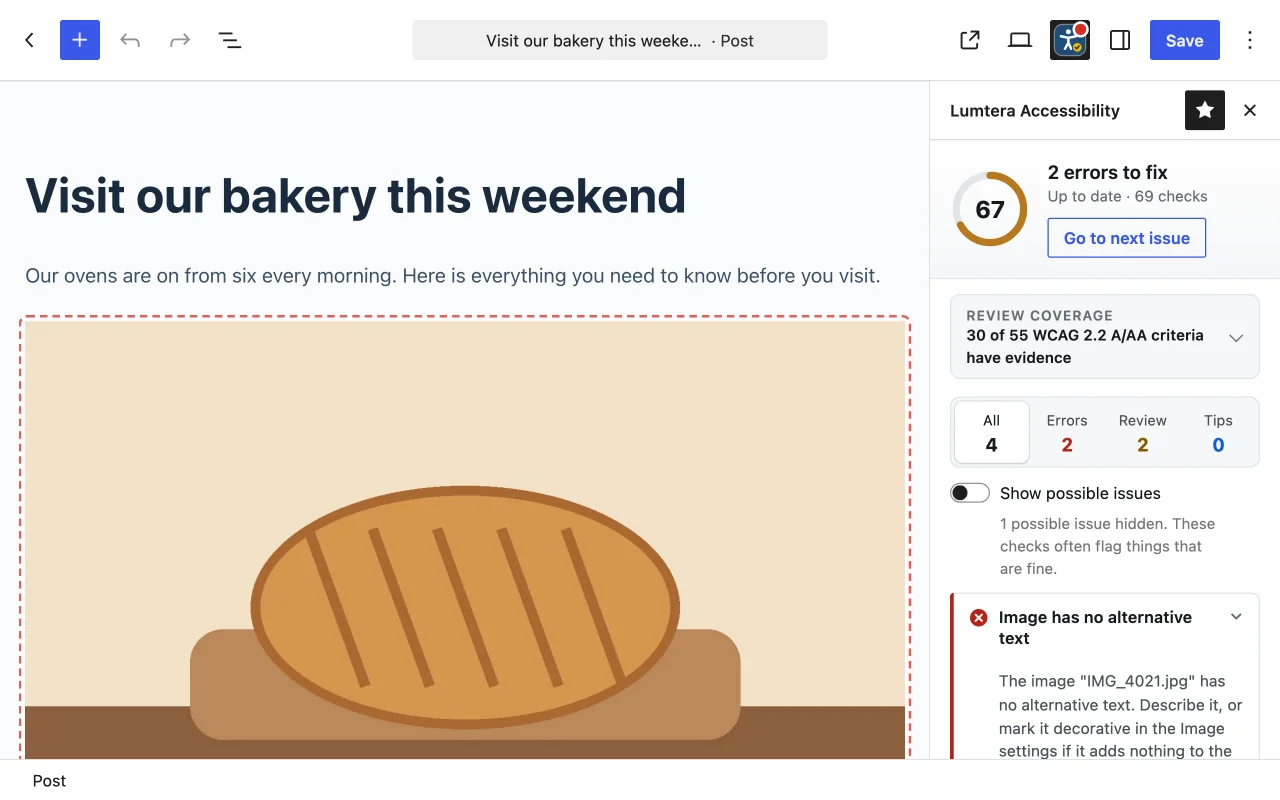
In the block editor, the classic editor or Elementor. Lumtera re-checks a moment after you stop typing.
-
See what needs attention
Errors, items a person must decide, and tips — each next to the block that caused it, with why it matters and the WCAG criterion.
-
Fix it on the spot
Follow the plain-language fix, or choose Fix: Lumtera shows the change before it is saved, and every fix can be undone. Fix a header or footer problem once, where it comes from.
-
Keep the whole site on track
Check everything in one click, work through the site report, and open any page in review mode to check the theme around your content with the keyboard and a screen reader preview.
The free plugin
Everything you need to find and fix issues is free
No trial and no page limits. Bulk scanning, custom post types, the admin column, the full-site report and CSV export are included, along with whole-page review, a keyboard walk, fixes you approve with undo and optional site fixes for theme problems.
See all featuresReview mode on the live page
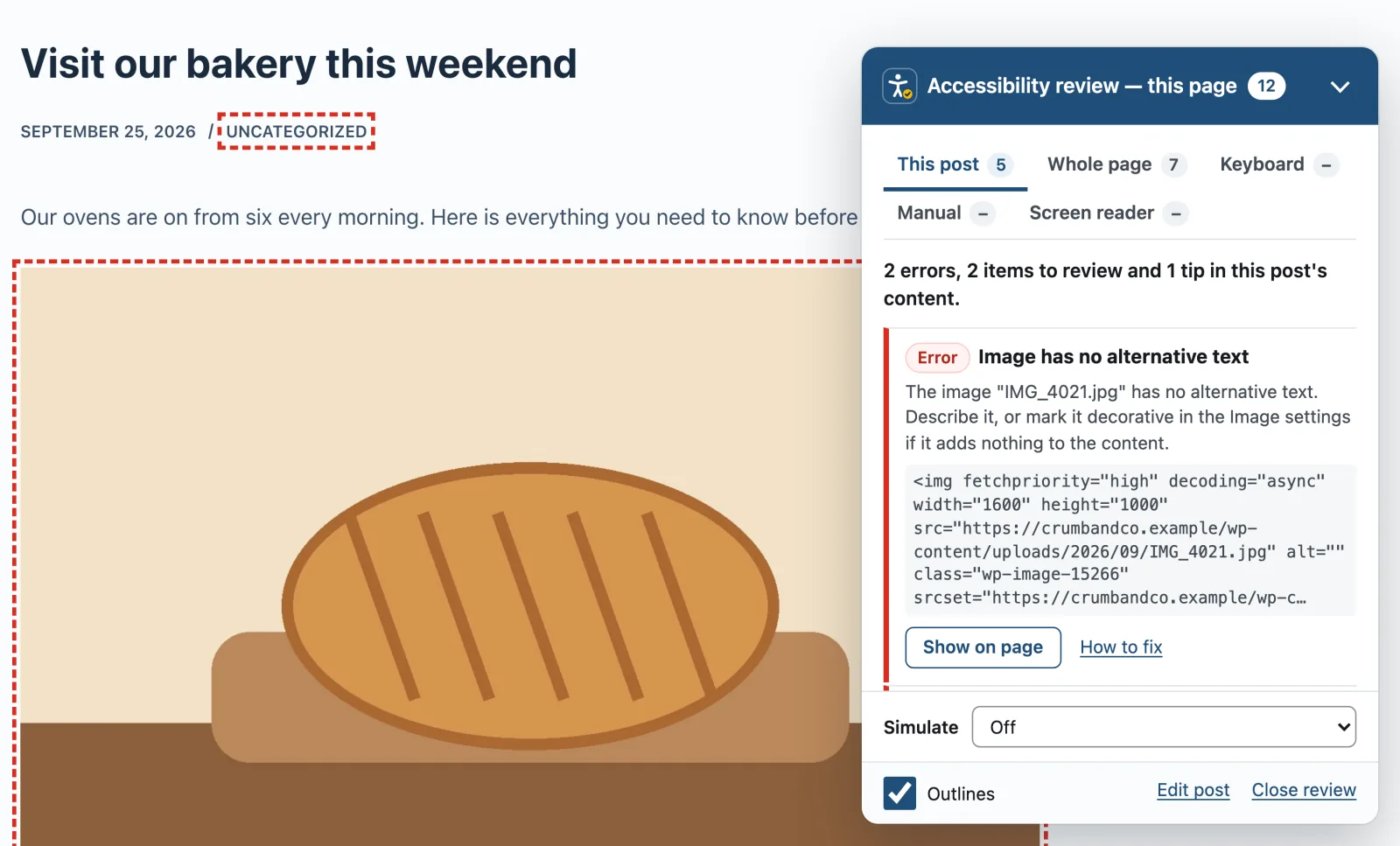
Open review mode from the admin bar to see issues outlined on the published page, then check the whole page, the keyboard and a screen reader preview.
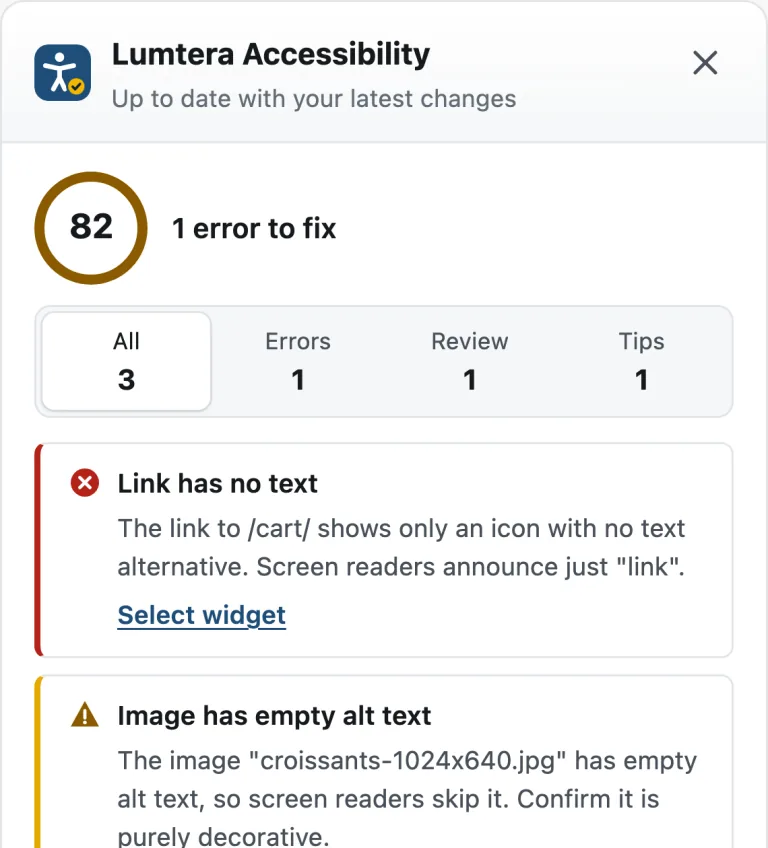
Live checks in Elementor
A Lumtera panel inside the Elementor editor that checks unsaved changes and selects each widget with a problem.
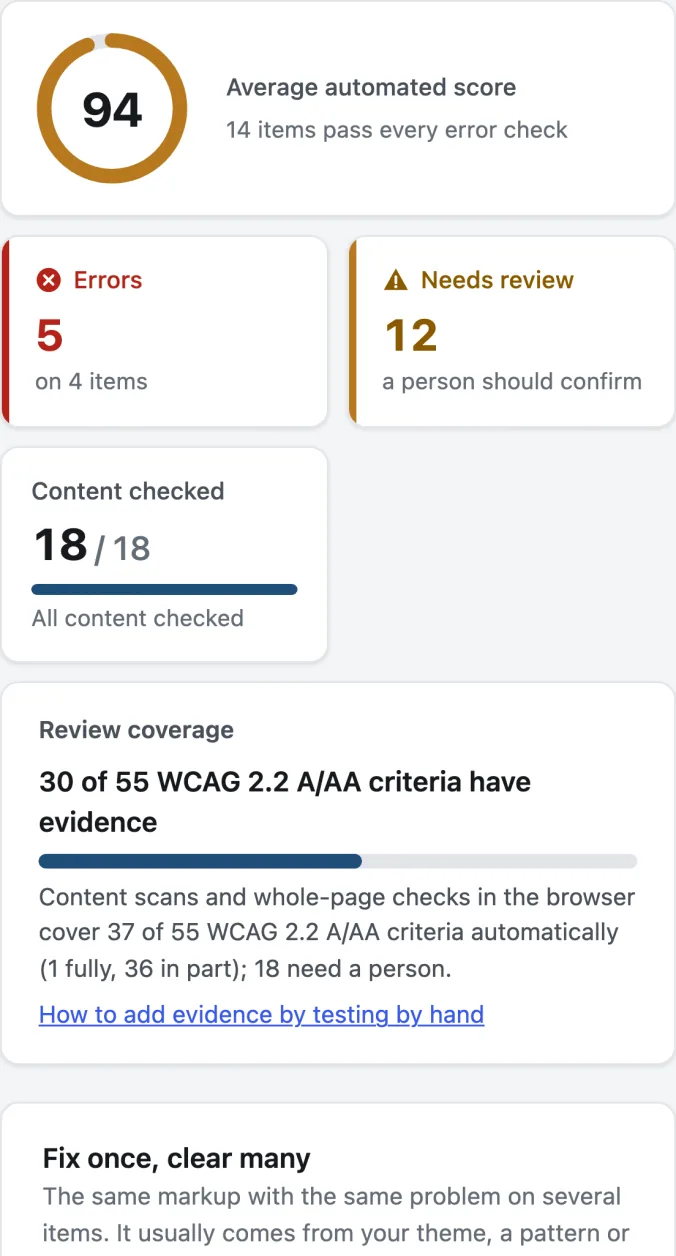
Site-wide report and bulk checking
Check every post, page, product and site part, then see the score, errors, review coverage and the issues that repeat across the site. Export it as CSV.
Alt text manager
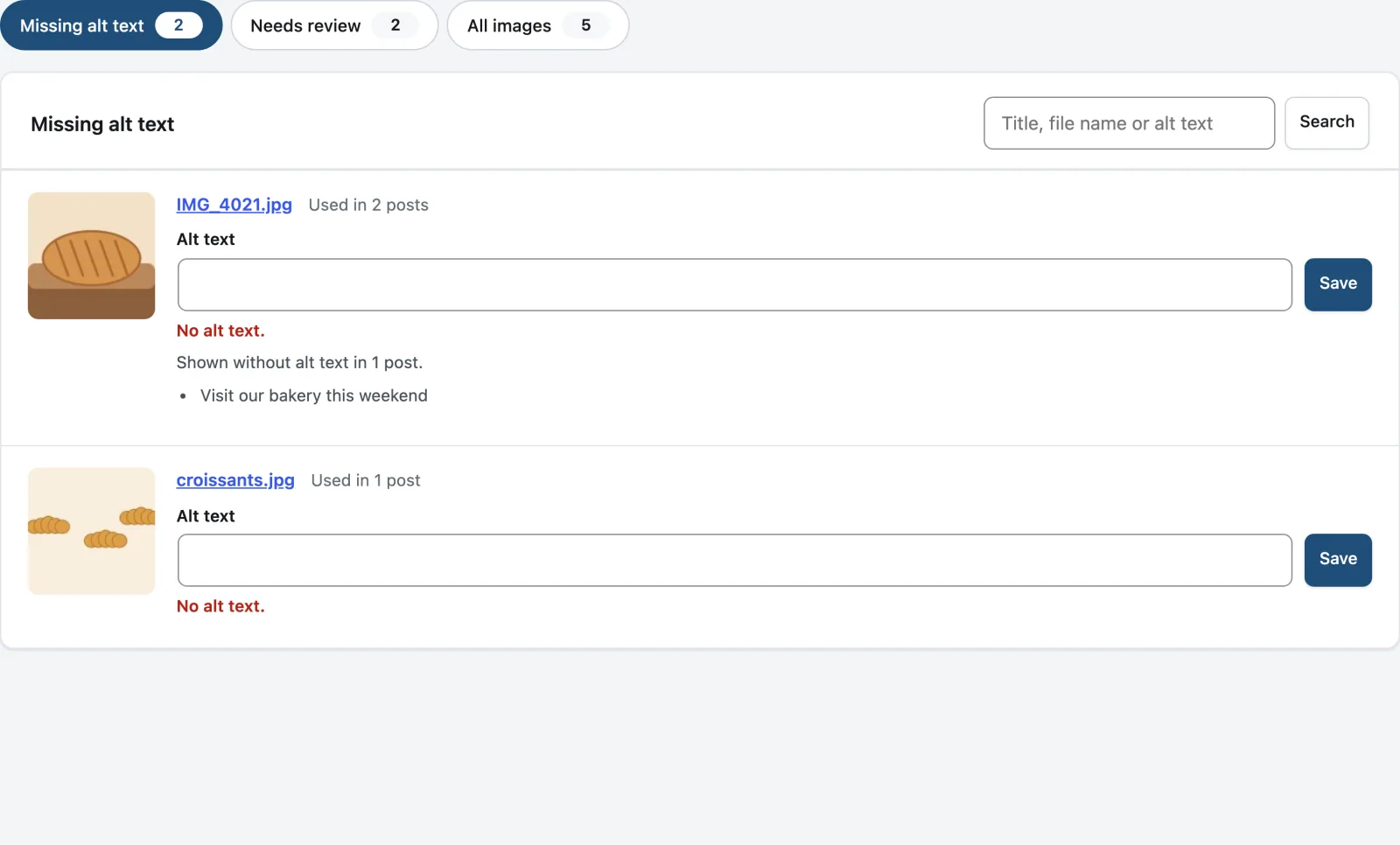
Every Media Library image with missing or doubtful alt text in one list. Describe an image once and add the text to the posts that show it.
Adjustable checks and dismissals
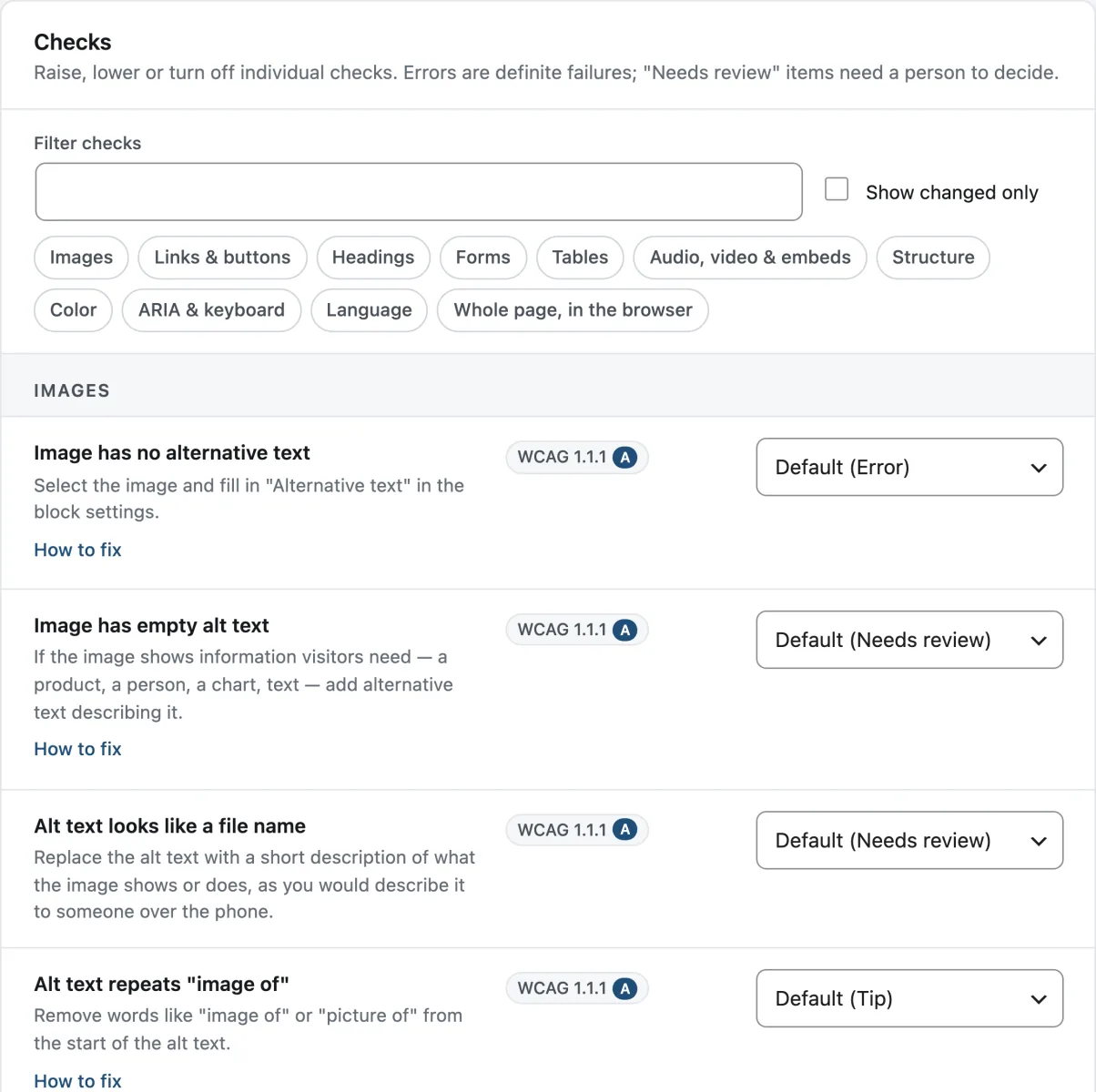
Set any check to Error, Needs review, Tip or Off. Dismiss an issue with a reason, and it stays dismissed — with a record of who, when and why.
Accessibility statement generator
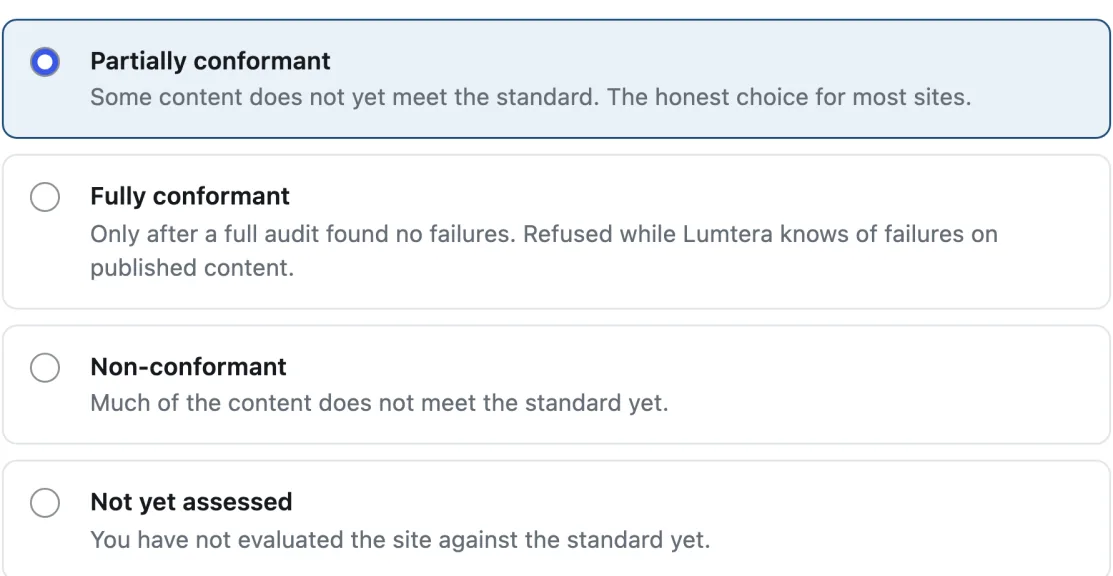
A draft statement for WCAG 2.1, WCAG 2.2 or EN 301 549, with templates for the EAA, UK public sector, ADA Title II and AODA, built from your own findings.
Also in the free plugin
Keyboard walk and widget tests
Free
Review mode's Keyboard tab numbers every Tab stop on the page, flags focus you cannot see, and opens menus, dialogs and tabs from the keyboard.
Screen reader preview
Free
See roughly what a screen reader lists on a page: headings, landmarks, links and form fields, plus the whole page in reading order.
Fixes you approve, with undo
Free
Fix saved content from the Content report or the editor: see the change before and after, edit it, approve it, and undo it later.
Fix at the source, with site parts
Free
Headers, footers, menus, synced patterns and widget areas are checked on their own, so a problem on every page is shown once and fixed once.
Contrast everywhere, with a palette fixer
Free
Contrast measured on gradients, images, text shadows, controls and focus rings, plus a block editor fix that suggests the nearest passing color from your palette.
Honest coverage meter
Free
Next to every automated score, a meter shows how many WCAG 2.2 A/AA criteria the checks cover, how many have evidence and how many need a person.
Built not to cry wolf
69 content checks, each mapped to a WCAG 2.2 success criterion
Anything a machine cannot decide on its own is marked "Needs review", never "Error". In the editor, contrast is checked only when both colors are set in the content, so your theme never causes a false alarm; review mode then runs 33 whole-page checks on the colors, focus and keyboard use your theme really produces.
Browse the check libraryWho it is for
Made for the people who actually publish the content
-
Agencies & freelancers
Check every client site, fix the same issue on many pages at once, send white-label reports and share links, and watch every client site from one portfolio.
-
WooCommerce stores
Product descriptions are checked by default and review mode checks any product page as rendered. Pro checks the shop, cart and checkout on a schedule and tests the classic checkout form without creating an order.
-
EU businesses (EAA)
A feedback form with an inbox and an EAA statement template, free — plus, in Pro, response targets, burden records and a tamper-evident record of the work.
-
Public sector & education
ADA Title II exception tags and statement templates, free; PDF checks, scheduled checks and a VPAT 2.5 conformance report in Pro.
-
Content teams
Writers and editors see problems as they write, with plain-language fixes they approve before anything is saved — no accessibility training needed to start.
-
Developers
WP-CLI with exit codes and baselines, so CI fails only on new issues; SARIF, JUnit, a REST API, hooks and WordPress abilities.
Lumtera Pro
When you are responsible for the whole site, not just the post in front of you
Lumtera Pro checks many pages at desktop and phone width on a schedule, tests your forms, keeps a tamper-evident record of the work, fixes the same issue on many pages at once, with every change approved by a person, and turns results into reports, including a VPAT 2.5 conformance report on every plan. From $96.85 a year.
See Pro plansPage checks for key pages and templates
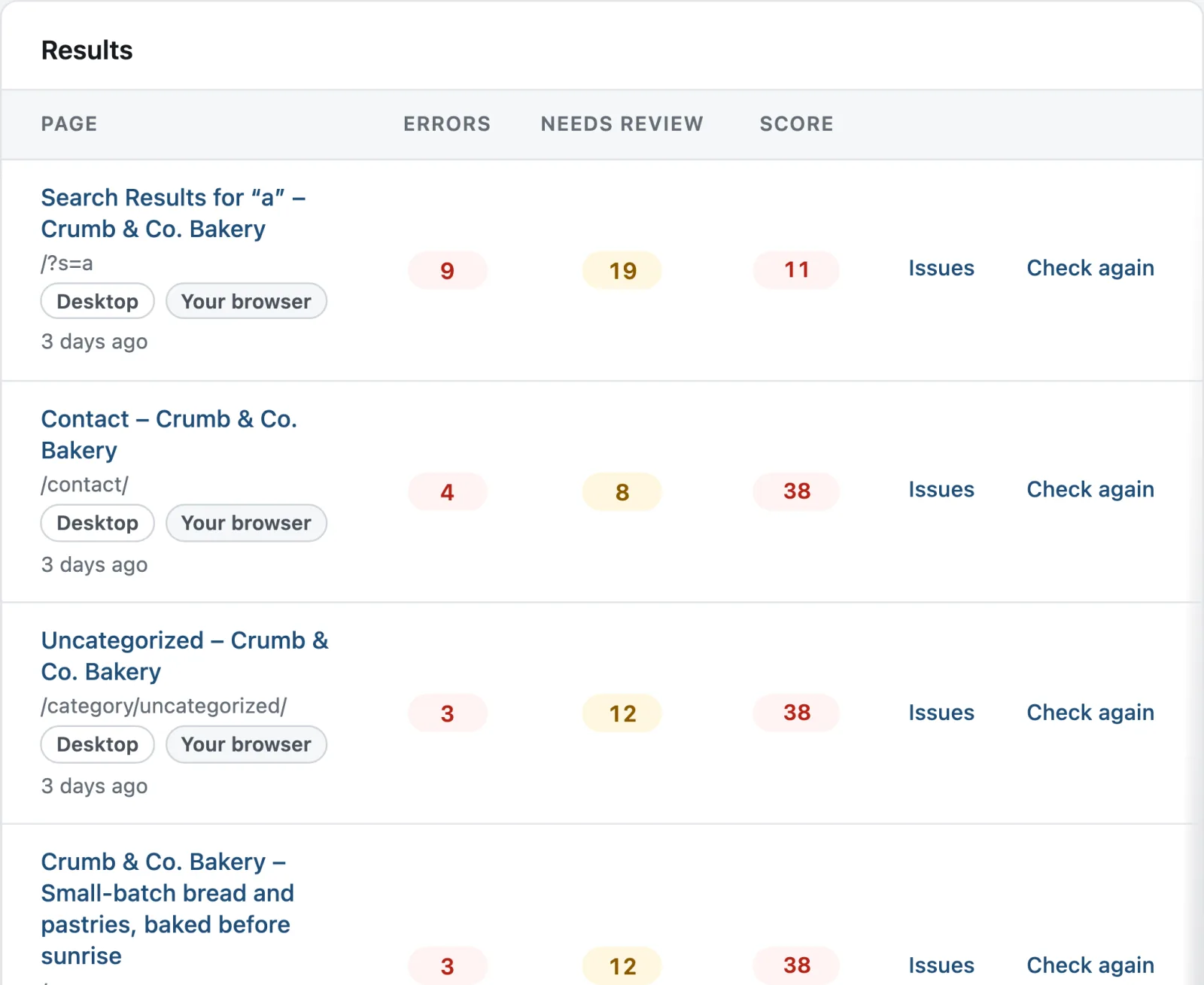
Check many live pages in one run, at desktop and phone width, on the same audit engine as review mode, and keep every result for reports.
Email and Slack alerts
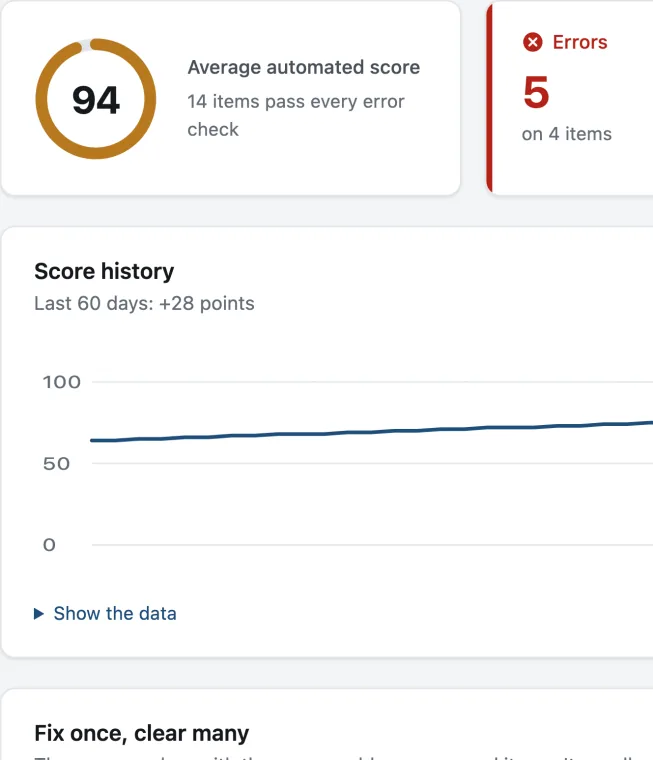
Hear about it when a publish adds new errors or feedback goes past its target, never twice for the same one, plus a Monday summary and a score history.
Fix tracking
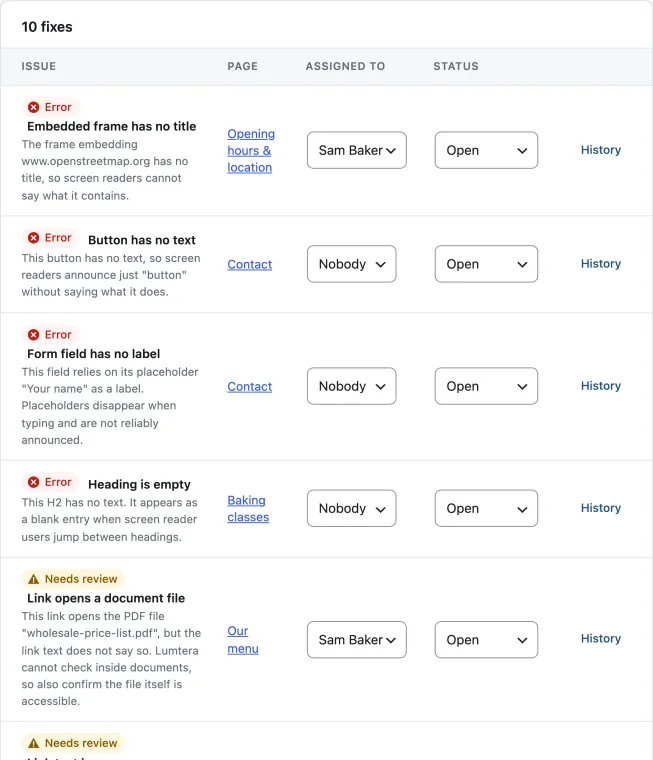
Turn issues into tasks, assign them, and let Lumtera close each task when a re-scan confirms the fix.
Branded client reports
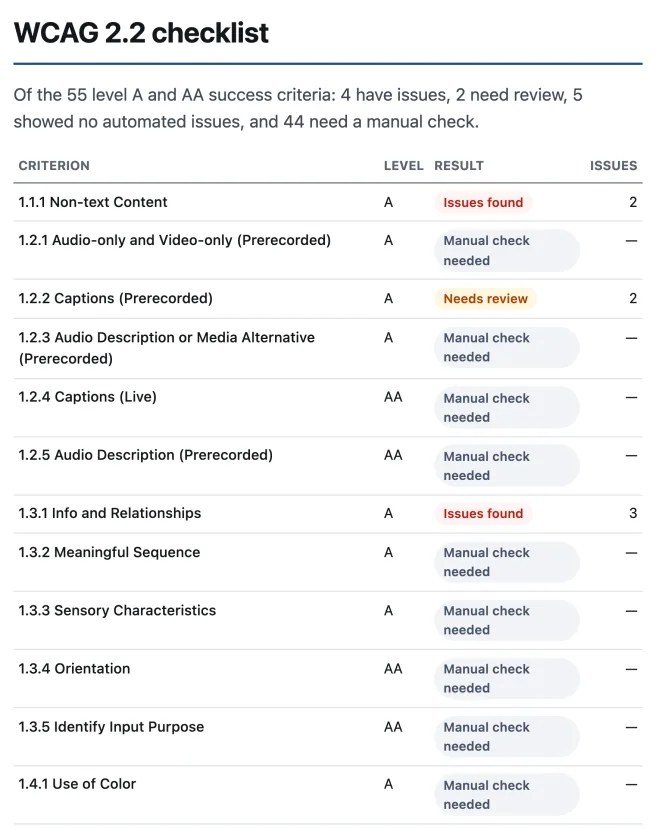
Reports with your logo and colors, covering all 55 WCAG 2.2 A and AA criteria, saved as a tagged PDF, plus a conformance report on every plan.
PDF accessibility checks
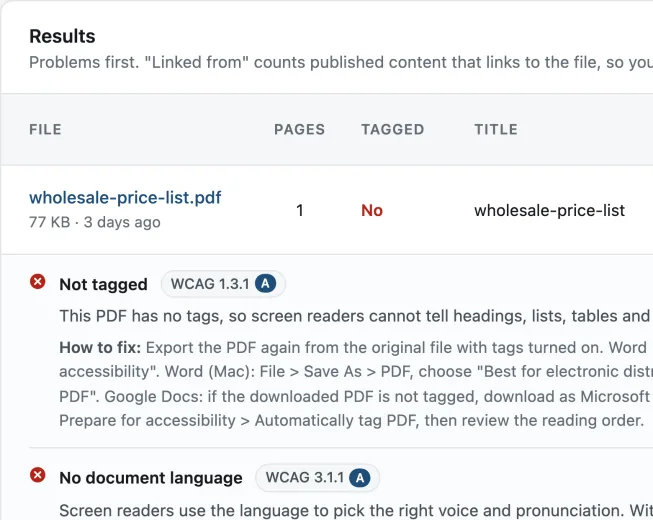
Check the PDFs in your Media Library for tags, title, language, scanned pages, bookmarks and restrictive encryption.
Also in every Pro plan
Form tests
Pro
Submit a form empty in a hidden frame, safely, and see whether its errors are shown, announced and linked to their fields.
Tamper-evident evidence log and evidence pack
Pro
A dated record of scans, manual tests, statement changes, fixes and feedback, hash-chained so changes can be detected, with a pack you can print or export.
Fixes queue: bulk fixes you review and approve
Pro
Propose the same fix on many pages at once — built-in fixes or text you write (and AI drafts, only if you connect an AI provider) — review every change, then apply and undo them in the background.
Test sessions
Pro
Test each key page template by hand, record the assistive technology and browser used, add screenshots, and sign the results off.
Compare scans
Pro
See what is new, what was fixed and what is still there between two scans, by check and by site part, with the likely cause marked.
Signed-in checks
Pro One role; any number on Agency
Check My account, cart, checkout and members' pages as a view-only test user with the role you choose, such as a WooCommerce customer: one role on Personal and Growth, any number of roles on Agency and Unlimited.
EAA toolkit
The parts of the European Accessibility Act that live on your site, free
A way for visitors to report a barrier, a statement that says honestly where you stand, and a record of the exceptions you rely on. These tools support your conformance work; they are not legal advice.
Read the EAA guideAccessibility feedback form and inbox
Free
A form visitors use to report a barrier or ask for an accessible version, and an inbox with reference numbers, statuses, email replies and notes.
Accessibility statement generator
Free
A draft statement for WCAG 2.1, WCAG 2.2 or EN 301 549, with templates for the EAA, UK public sector, ADA Title II and AODA, built from your own findings.
ADA Title II exception tags
Free
Record which ADA Title II exception you believe applies to a post or file, with your reasoning. Tagged items stay in every total, marked "Exception claimed".
Standards and laws
One standard sits behind the laws that matter to your site
Lumtera checks against WCAG 2.2 Levels A and AA. That covers what WCAG 2.1 and 2.0 require (apart from the retired 4.1.1 Parsing), which is what these rules point to.
WCAG 2.2 checklist for WordPress-
WCAG 2.2
Worldwide
The W3C standard behind almost every accessibility law. A Recommendation since October 2023, and ISO/IEC 40500:2025 since October 2025. Levels A and AA contain 55 success criteria.
-
European Accessibility Act
European Union
Has applied since 28 June 2025 to e-commerce, banking, e-books, transport and other consumer services sold in the EU. Its technical standard, EN 301 549, is built on WCAG.
European Commission: European Accessibility Act
Read the EAA guide -
ADA Title II
US state & local government
Websites and apps must meet WCAG 2.1 AA — by 26 April 2027 for entities serving 50,000 people or more, and 26 April 2028 for smaller ones, after the Department of Justice extended the dates in 2026.
Federal Register: extension of compliance dates (April 2026)
Read the ADA Title II guide -
ADA Title III
US businesses
There is no web regulation, but courts apply the ADA to websites. More than 5,000 digital accessibility lawsuits were filed in US federal and state courts in 2025, nearly 70% of them against online stores.
UsableNet: 2025 ADA web lawsuit report
Got a demand letter? Read the guide -
Section 508
US federal agencies
Federal agencies — and the vendors who sell to them — must meet WCAG 2.0 Level A and AA for the technology they build, buy and use.
Checked on September 28, 2026. This is general information, not legal advice. Lumtera supports your conformance work; no tool can certify that a site conforms.
Honest by design
A score of 100 means “no automated issues found” — never “compliant”
In Deque's 2021 study of more than 13,000 audited pages, automated tests found 57% of all issues by volume — and a much smaller share of the WCAG success criteria. The rest needs people. Deque: automated testing study
So Lumtera tells you which findings are certain, which need you to decide, and what it cannot see. The coverage meter sits next to the score and is never merged into it, guided checklists walk you through the criteria that need a person, and the accessibility statement never says "fully conformant" on its own.
- 37 of 55 WCAG 2.2 A and AA criteria covered by automated checks with review mode, fully or in part (25 from saved content alone, 40 with Pro's form tests, 44 with its consistency checks on Growth and up). Covering a criterion is not the same as meeting it.
- 98% of failing examples found at any severity, on the 21 W3C ACT rules Lumtera's checks cover (130 of 132). As errors alone, 72%; axe-core found 80% on the same pages. How we tested
- 1.8% of the passing examples reported as an error in the same tests (4 of 222). Anything a machine cannot decide is marked Needs review instead.
Our promises
What you can count on
- No account.
- Nothing leaves your site unless you turn on your own AI provider or the Akismet spam check.
- No overlay: nothing is added for visitors unless you add it.
- Every fix is shown before it is saved, and can be undone.
- No nags: no pop-ups or upgrade notices. Pro tips are one line and can be dismissed.
- Every check, and fixing issues one at a time, stays free.
Pricing
Start free. Upgrade when you need the whole-site tools.
Pay for Lumtera Pro each year, or once for a lifetime license.
Compare plansKey dates: the European Accessibility Act has applied since 28 June 2025; ADA Title II requires WCAG 2.1 AA by 26 April 2027 for larger public entities and 26 April 2028 for smaller ones.
-
For one website
Personal
Regular price$149$96.85/yearRegular price$499$324.35 once -
Recommended
For up to 5 sites
Growth
Regular price$299$194.35/yearRegular price$899$584.35 once -
For up to 25 sites
Agency
Regular price$599$389.35/yearRegular price$1,799$1,169.35 once -
For any number of sites
Unlimited
Regular price$999$649.35/yearYearly only
14-day refund (opens in a new tab)Keeps working if you don't renew
Pro is an add-on: your free setup, settings and results stay. Compare Free and Pro
Questions
Something else on your mind? Contact support
Is Lumtera on WordPress.org?
Yes. The free plugin is in the WordPress.org plugin directory as "Lumtera – Accessibility Checker – WCAG, ADA, EAA and Section 508 Compliance" (wordpress.org/plugins/lumtera), currently at version 1.2.2. Search for Lumtera under Plugins → Add New Plugin, and WordPress offers each new release as an update. Lumtera Pro is sold only on mantrabrain.com.
Will Lumtera make my site ADA or WCAG compliant?
No tool can do that on its own, and you should be wary of any that claims to. With review mode, Lumtera's automated checks cover 37 of the 55 WCAG 2.2 A and AA criteria, fully or in part, and covering a criterion is not the same as meeting it. Lumtera helps you find and fix what automation can find, tells you which items need a person to decide, walks you through the manual tests, and never shows a score of 100 as "compliant".
Is Lumtera an overlay?
No. There is no widget, toolbar or script that rewrites pages for visitors. Lumtera works in the editor and admin, helping you fix the content itself — which is what WCAG, the ADA, the European Accessibility Act and Section 508 ask for. The optional site fixes for theme problems are off by default and change the HTML your server sends, the same for every visitor.
Does Lumtera help with the EAA, ADA Title II and Section 508?
Yes, as a tool for the work, not a guarantee. All three point to WCAG: the European Accessibility Act through EN 301 549 (WCAG 2.1 AA), the ADA Title II web rule (WCAG 2.1 AA) and Section 508 (WCAG 2.0 AA). Lumtera checks against WCAG 2.2 A and AA, which includes those criteria. The free plugin adds accessibility statement templates (EAA, UK public sector, ADA Title II and AODA), a feedback form with an inbox, and ADA Title II exception tags. Lumtera Pro adds a VPAT 2.5 conformance report (the WCAG edition) and a tamper-evident evidence log. Automated checks find some barriers, not all, so manual testing is still needed.
What is the difference between Lumtera free and Lumtera Pro?
The free plugin finds and fixes issues: every check, review mode for whole pages, fixes you approve one at a time, the site report and the EAA toolkit, with no page limits. Lumtera Pro is an add-on for the whole site and for proving the work: page checks of many pages at desktop and phone width on a schedule, form tests, PDF checks, an evidence log, a fixes queue for bulk fixes, client reports and a VPAT 2.5 conformance report. Pro needs the free plugin installed.
How much does Lumtera Pro cost?
Yearly licenses are Personal $96.85 a year for 1 site, Growth $194.35 for 5 sites, Agency $389.35 for 25 sites, and Unlimited $649.35 for any number of sites. Lifetime licenses are one payment with no renewals, from $324.35 for 1 site. Prices are in US dollars, and the free plugin costs nothing.
What does the free plugin include?
All 69 content checks in the block editor, the classic editor, Elementor and other page builders; review mode with 33 whole-page checks, the keyboard walk, widget tests and a screen reader preview; contrast checks everywhere with a palette fixer; fixes you approve, with undo, one at a time; fix at the source for site parts; the coverage meter and guided checklists; the EAA toolkit (feedback form and inbox, statement templates and ADA Title II exception tags); bulk scanning, the site report and CSV export; the alt text manager; WP-CLI with baselines, SARIF and JUnit; WordPress abilities; an optional weekly home page check and email summary; and optional AI suggestions through your own provider. No page limits, no account.
Does any of my content leave my site?
Not by default. Checks, fixes, reports and the feedback inbox run and are stored inside your WordPress, with no account and no tracking. Nothing leaves your site unless you turn on AI suggestions (sent to the AI provider you connect to WordPress, only when someone clicks) or the optional Akismet check for the feedback form (off by default; needs the Akismet plugin).
Does it check my theme?
Yes, for free. Menus, widget areas, template parts, synced patterns and navigation are checked when they are saved and listed as site parts, so an issue in the footer is fixed once. Review mode checks any post, page, product, archive or search page as your browser renders it — header, menus, footer and page-builder output — with real contrast, a keyboard walk and widget tests for menus, dialogs and tabs. Lumtera Pro checks many pages and templates at once, at desktop and phone width, and on a schedule.
How are fixes applied?
Only with your approval. Choose Review fix on an issue in the block editor, or Fix without opening in the Content report, and Lumtera shows the change before anything is saved; you can edit, approve or cancel it. An approved fix is saved as a new revision, checked again, and can be undone. Content a page builder manages is never written to: Lumtera tells you what to change in the builder instead.
What are site fixes?
Optional, server-side fixes for common theme problems: a skip link, a visible focus ring, pinch-zoom, underlined content links, labels for the search and comment forms, "opens in a new tab" text and file details on document links. Each is off until you turn it on. They are not an overlay and do not make a site compliant; fixing the theme itself is better.
Will it slow my site down?
No. No checks run for visitors, and nothing is added to your pages unless you add it, such as the feedback form. Checks run in the editor, the admin and review mode, and bulk scans run in small batches.
I got an ADA demand letter. Do I need Pro?
No. Talk to a lawyer first; this is not legal advice. The free plugin finds and helps you fix what automated checks can find, on every page. Lumtera Pro adds scheduled checks of key pages and a dated, tamper-evident record of the work, which helps you show what you did and when. Our demand letter guide walks through the first weeks.
How do I install the free plugin?
The "Download free" buttons download the plugin as a .zip file. Install it like any plugin zip:
- In your WordPress admin, go to Plugins → Add New Plugin and press Upload Plugin. Choose the zip you downloaded; do not unzip it first.
- Press Install Now, then Activate Plugin. Lumtera adds its own menu to the WordPress admin, with a short getting-started checklist.
- On Lumtera's Overview screen, choose Check all content. Every post, page and product is checked against 69 WCAG 2.2 checks, and the site report lists what to fix first.
- While logged in, open any page and start review mode from the admin bar. It checks the whole page your theme renders, with a keyboard walk.
- Bought Lumtera Pro? Install this free plugin first, then download Lumtera Pro from your account and activate it alongside.
- Prefer not to download? Lumtera is also in the WordPress.org directory: go to Plugins → Add New Plugin, search for Lumtera, and press Install Now.
Where do I download Lumtera?
Right here: the "Download free" buttons give you version 1.2.2 of the free plugin as a .zip. Install it like any plugin zip, as in "How do I install the free plugin?" above, or install it from the WordPress.org plugin directory without downloading anything. Either way, WordPress offers new releases as updates from WordPress.org, and your settings and results stay. Every release is listed on the changelog page.
What do I need to run it?
WordPress 6.6 or newer and PHP 8.1 or newer. It works with the block editor, the classic editor, Elementor and other page builders, and on multisite. Lumtera Pro 1.1 needs the free plugin at version 1.2.1 or newer.
Start with the free plugin today
All 69 content checks and 33 whole-page checks, fixes you approve with undo, and the site report — free, with no account and no page limits.