Find and fix while you write Free
Live checks in Elementor
A Lumtera panel inside the Elementor editor that checks unsaved changes and selects each widget with a problem.
Updated for Lumtera 1.3.0 and Lumtera Pro 1.2.0.
Overview
Elementor keeps a page's layout as data in post meta, and the post content holds only a simplified copy for search engines. Lumtera renders Elementor pages through Elementor's own element API instead, so the checks see the markup your widgets really produce. This applies everywhere Lumtera checks a saved page: the site report, the Accessibility column, WP-CLI and the live panel.
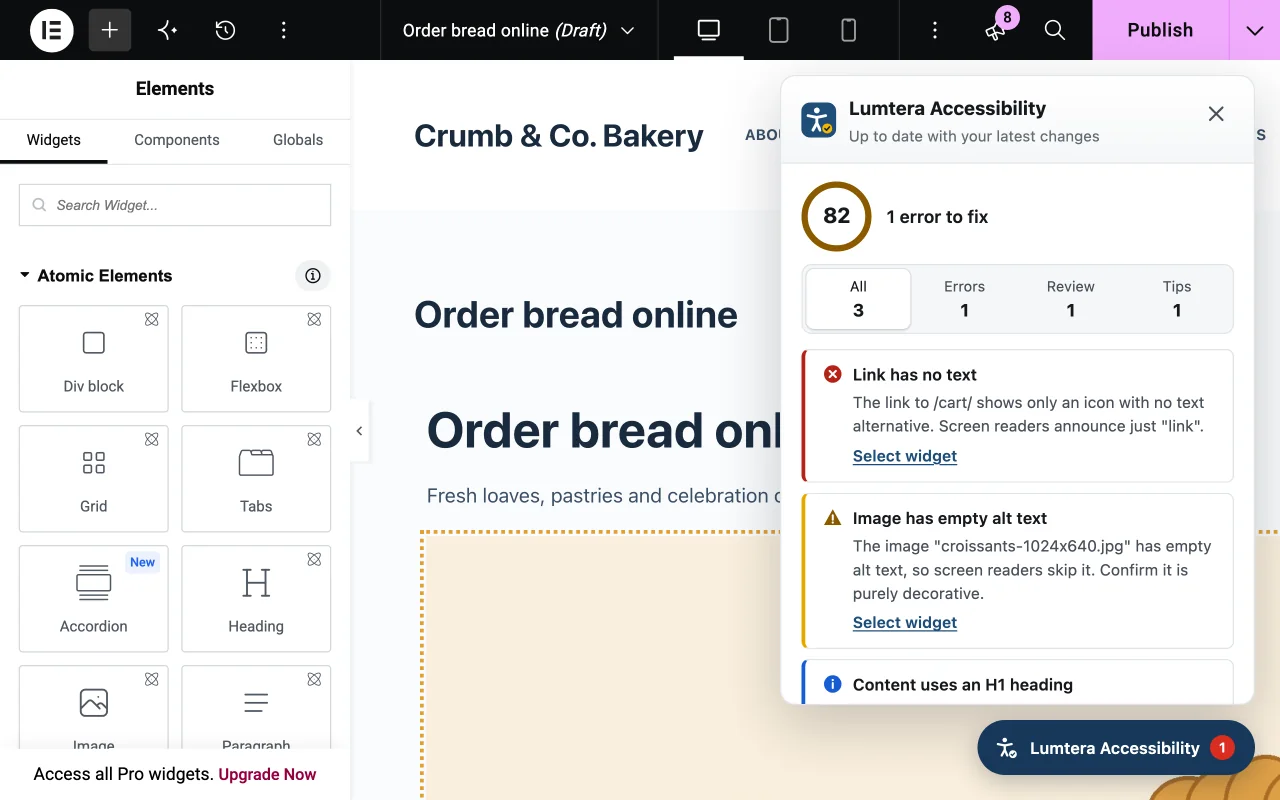
Inside the Elementor editor, Lumtera adds a Lumtera Accessibility button that opens its panel. The panel shows a score, a headline such as "3 errors to fix", the reading level in the languages Lumtera measures, and filter buttons for All, Errors, Review and Tips. Each issue expands to How to fix and a WCAG link. The status line reads "Up to date with your latest changes" when a check has finished.
The panel checks the page as it is in the editor right now. Lumtera re-checks shortly after you change an element or its settings, and looks again every five seconds for anything else, skipping the request when nothing changed. Select widget selects the element in Elementor and scrolls it into view, and "Outline widgets with issues" marks them in the preview.
Why does it matter?
Elementor pages are not stored as normal post content, so most checkers either miss them or check an empty page. And a checker that only runs after saving tells you about problems you have already published.
What do you get?
- Checks Elementor's own rendered output, not an empty post body.
- A panel inside the Elementor editor checks your unsaved changes.
- Select widget jumps to the widget that caused each issue.
- Dismiss a finding with an optional reason, as in the block editor.
- With "Check content on save" on, pages are checked again whenever Elementor saves them.
How does it work?
-
Edit with Elementor
Open the Lumtera panel from the Elementor editor.
-
Check before you save
The panel checks the page as it is now, including changes you have not saved yet.
-
Jump to the widget
Select an issue and Elementor selects the widget, ready to fix.
Who is it for?
-
Agencies building client sites
Designers see empty buttons and unnamed icon links while they build each page, instead of finding them in an audit after launch.
-
Owners editing their own landing pages
A quick change, such as swapping an image or a button label, is checked before saving, so it does not quietly add a new error.
-
Sites that mix Elementor and blocks
Both kinds of page appear in the same Overview and Content report. Edit links open Elementor for Elementor pages and the block editor for the rest.
Good to know
How it behaves, what it needs, and where its limits are.
- The page itself, not its templates
- The panel checks the post being edited. Headers, footers and other Theme Builder templates are not part of that post and are not checked there, even when they are open in the editor. The Whole page tab in review mode checks them on the published page.
- Contrast in the panel is limited
- The panel checks contrast only where the markup itself sets both the text and background colors. To measure colors that come from Elementor's global styles or generated CSS files, open the published page in review mode and use the Whole page tab.
- No quick fixes here
- The panel finds and selects the widget but does not change it. You make the fix in the widget's own settings.
- Dismissing in Elementor
- Items can be dismissed and restored from the panel, with an optional reason under "Why is this not a problem?", as in the block editor. Dismissing an error needs the Dismiss errors permission, which editors and administrators have by default. When a dismissed issue comes back, the panel says why under "Showing again".
- Permissions
- The panel loads for users who can edit the post, and live checks also respect Elementor's own role manager.
Checks you will see here
-
WCAG 1.1.1 · ANeeds review
Image has empty alt text
-
WCAG 4.1.2 · AError
Button has no text
-
WCAG 2.4.4 · AError
Link has no text
Questions
Something else on your mind? Contact support
Do I need Elementor Pro?
No. Lumtera works with the free Elementor plugin. The panel checks the content of the page you are editing; Theme Builder headers and footers are not part of that check. To check them, open the published page in review mode and use the Whole page tab.
Is the Elementor integration part of Lumtera Pro?
No, it is in the free plugin.
Is anything saved when the panel checks?
No. The unsaved layout is sent to your own server, rendered and checked, and the results come back to the panel. When Elementor saves the page, Lumtera checks it again for the reports, as long as "Check content on save" is on.
How do I fix alt text on Elementor images?
Elementor reads alt text from the Media Library, so describing an image once on the Alt text screen updates every Elementor page that uses it.
More in “Find and fix while you write”
-
Free
Live checks in the block editor
A Lumtera Accessibility sidebar that re-checks your post a moment after you stop typing, and shows each problem next to the block that caused it.
-
Free
One-click quick fixes
Skipped heading levels, fake lists, bold "headings", new-tab links, table headers, spacing and low-contrast text colors, fixed in one click. Every fix can be undone.
-
Free
Fixes you approve, with undo
Fix saved content from the Content report or the editor: see the change before and after, edit it, approve it, and undo it later.
Start with the free plugin today
All 88 content checks and 38 whole-page checks, fixes you approve with undo, and the site report — free, with no account and no page limits.