Test live pages Pro
PDF accessibility checks
Check the PDFs in your Media Library for tags, title, language, scanned pages, bookmarks and restrictive encryption.
Updated for Lumtera 1.3.0 and Lumtera Pro 1.2.0.
Overview
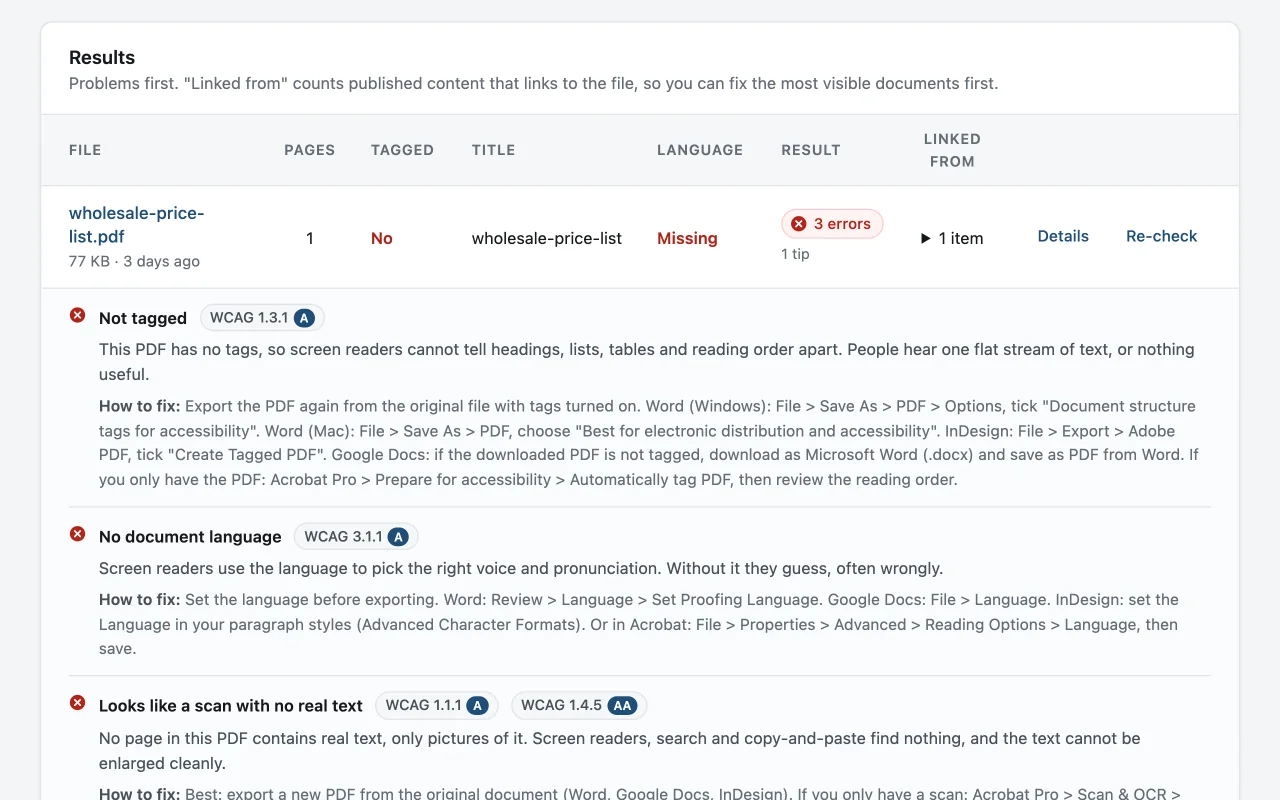
PDF checks adds a Documents screen under Lumtera → Checks. It lists the PDFs in your Media Library, with counts for Passing, With problems and Not checked at the top. The table shows each file's pages, whether it is tagged, its title, its language, the result and Linked from: how many published posts, pages, templates and menus link to it. Files with problems come first, so the most visible ones are easy to find.
New PDFs are checked as they are uploaded. Files over 10 MB, imports and the third or later PDF in one upload go to a background job instead, so uploads stay quick. A daily job picks up anything new or changed, and Check all documents runs the whole library from the screen. Results are stored with each file and reused until the file changes.
Details on each row lists the findings, each with its WCAG criterion and a How to fix note with the exact setting in Word, Google Docs, InDesign or Acrobat. Re-check inspects one file again. A file replaced through a media-replace plugin is checked again on its own. When the Content report flags a link to a PDF from your Media Library, it points to that file's result on the Documents screen.
Why does it matter?
Menus, price lists, forms and reports often live in PDFs that were never made accessible. A scanned or untagged PDF is a picture of text: a screen reader has nothing to read.
What do you get?
- Untagged or badly tagged PDFs (WCAG 1.3.1).
- Missing or file-name titles (2.4.2) and missing or invalid language (3.1.1).
- Image-only and partly scanned pages (1.1.1, 1.4.5), and long documents without bookmarks (2.4.5).
- Encryption settings that block assistive technology.
- Runs on your server in pure PHP, so files never leave the site.
How does it work?
-
Open Lumtera → Checks → Documents
PDFs in the Media Library are listed, with problems first.
-
Check them
Each file is inspected and the results are cached until the file changes.
-
Fix the source file
Findings explain what to change when exporting from Word or Google Docs.
Who is it for?
-
Councils and public bodies
Agendas, minutes, forms and annual reports are often published as PDFs. The Documents screen shows which ones have no tags or no real text.
-
Restaurants and small businesses
A scanned menu or price list is a picture of text. The check flags it, and the fix explains how to export a real PDF from the original file.
-
Schools and universities
Handbooks and policies grow long. Documents over ten pages without bookmarks are flagged, with the export setting that creates them.
Good to know
How it behaves, what it needs, and where its limits are.
- Plans and access
- Included in every Pro plan. The Documents screen needs the same permission as the Lumtera reports, editors and administrators by default.
- Limits
- Files over 50 MB are marked Too large to check. Each file has a time budget of about ten seconds; a file too complex to finish is marked Took too long to check. The screen lists up to 5,000 PDFs.
- No guessing
- When part of a file cannot be read, the affected checks are skipped and the result says Some checks skipped. An unknown answer is never reported as a pass.
- What still needs a person
- Reading order, alternative text on images, table structure and the accuracy of the tags are not checked. Use Acrobat Pro's accessibility checker or the free PAC checker for those.
- Scope
- Only PDFs uploaded to the Media Library are checked. PDFs hosted on other sites, and other formats such as Word or PowerPoint files, are not.
Checks you will see here
-
WCAG 2.4.4 · ANeeds review
Link opens a document file
Questions
Something else on your mind? Contact support
Is this a full PDF/UA audit?
No. It catches the most common, most serious problems automatically. Reading order and tag accuracy still need a person with a PDF tool.
Does it change or fix my PDFs?
No. Files are only read. You fix the source document or edit the PDF in a PDF editor, then upload the new file, which is checked again.
What does Passes basic checks mean?
No errors or items to review were found in tags, title, language, real text, security settings and bookmarks. It does not mean the PDF is fully accessible.
Are password-protected PDFs checked?
As far as possible. If the security settings forbid text access for screen readers, that is reported as an error. If the contents cannot be read at all, the file is marked Could not be checked, with steps to check it by hand.
More in “Test live pages”
-
Free
Whole-page review
Check a page the way visitors see it — theme, header, menus, footer and page-builder output — with {page_checks} checks for contrast, target size, keyboard and widgets.
-
Free
Keyboard walk and widget tests
Review mode's Keyboard tab numbers every Tab stop on the page, flags focus you cannot see, and opens menus, dialogs and tabs from the keyboard.
-
Free
Screen reader preview
See roughly what a screen reader lists on a page: headings, landmarks, links and form fields, plus the whole page in reading order.
PDF accessibility checks
Get it with Lumtera Pro
In every Pro plan. Personal is $149 a year. Pro installs alongside the free plugin, and your settings and results stay.
14-day refund (opens in a new tab)Keeps working if you don't renew