See the whole site Free
Accessibility statement generator
A draft statement for WCAG 2.1, WCAG 2.2 or EN 301 549, with templates for the EAA, UK public sector, ADA Title II and AODA, built from your own findings.
Updated for Lumtera 1.3.0 and Lumtera Pro 1.2.0.
Overview
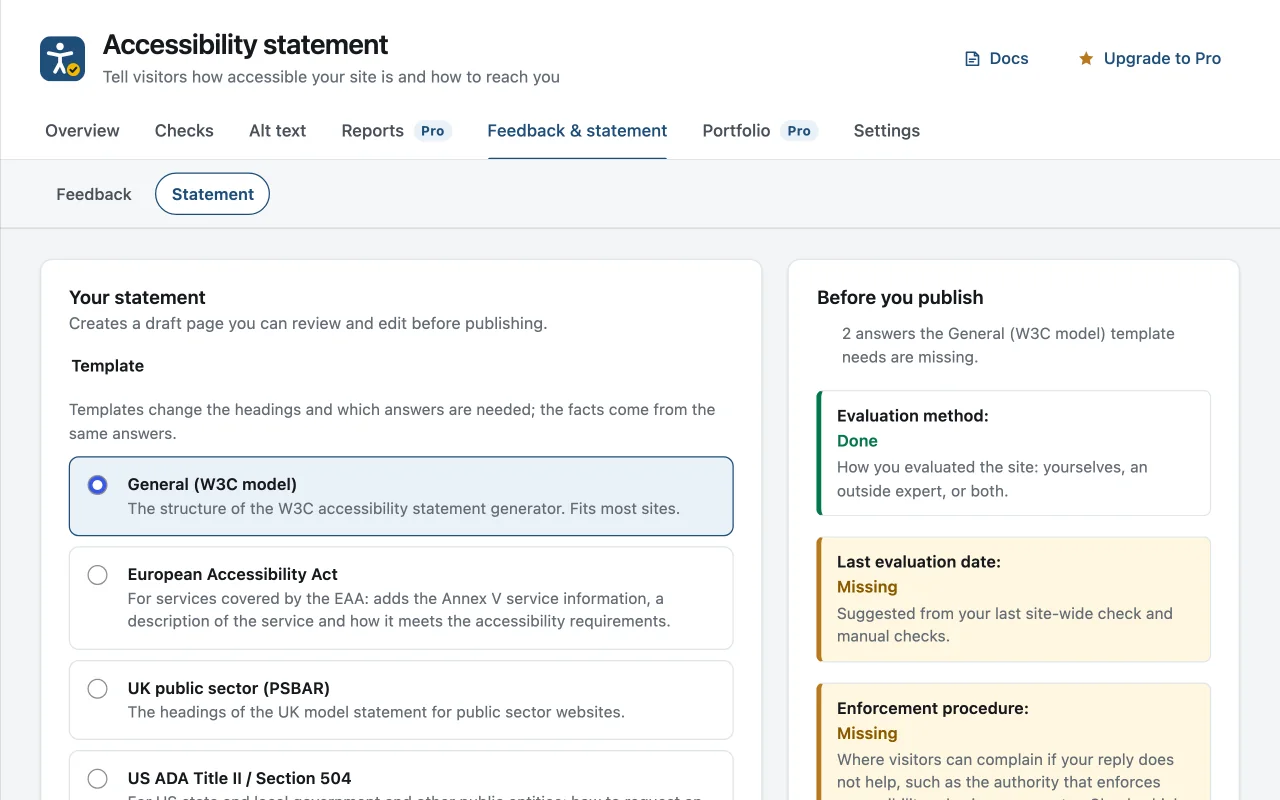
The statement generator is under Lumtera → Feedback & statement → Statement, for users who can publish pages. Start by choosing a template: General (the W3C model), European Accessibility Act, UK public sector (PSBAR), US ADA Title II / Section 504, or Ontario AODA. Templates change the headings and which answers are needed; the facts come from the same answers and the same findings. Then choose the standard: WCAG 2.1 level AA, WCAG 2.2 level AA, EN 301 549 V3.2.1 or EN 301 549 V4.1.1, each with a short note on when it applies.
Conformance status has four choices: Partially conformant, Fully conformant, Non-conformant and Not yet assessed. A new statement starts as partially conformant, or not yet assessed before anything has been checked. Fully conformant needs a ticked "A full audit of the site against the standard found no failures", and is refused while Lumtera knows of failures on published content; the draft then says "partially conformant" and the screen explains why.
The feedback section takes a contact email, an optional phone number and an optional form address, and needs at least one of them. If a published page has the Accessibility feedback form block, it is linked automatically. Known limitations are pre-filled from up to five checks with open errors, and a tick box adds "Requirements not yet met" by success criterion, with the EN 301 549 clause when you chose an EN standard. Click Create draft statement and Lumtera builds a draft page from Heading, Paragraph and List blocks. Nothing goes live until you publish it.
Why does it matter?
An accessibility statement tells visitors what to expect and how to report a problem. Public-sector sites in the EU and UK must publish one, and the European Accessibility Act expects many businesses to explain how their services meet accessibility requirements. Writing one from scratch, honestly and in the shape the rules expect, is a job most site owners put off.
What do you get?
- Choose the standard: WCAG 2.1 AA, WCAG 2.2 AA, EN 301 549 V3.2.1 or V4.1.1.
- Templates for the W3C model, the European Accessibility Act (Annex V), UK public sector (PSBAR), ADA Title II / Section 504 and Ontario's AODA.
- Requirements not yet met are listed by WCAG criterion, and by EN 301 549 clause, from errors on published content and failed manual checks.
- Never "fully conformant" by default: that status needs a confirmed full audit and no known failures.
- Links to your accessibility feedback form automatically, and is created as a draft for you to review.
How does it work?
-
Open Lumtera → Feedback & statement → Statement
Pick a template and a standard, then fill in your organization, contact details and how you evaluated the site.
-
Check what the template needs
A "Before you publish" list shows which answers the template still needs, such as the enforcement procedure or, for the EAA, a description of the service.
-
Create the draft
Lumtera builds a draft page from ordinary blocks. Read it, adjust it and publish it yourself.
Who is it for?
-
Businesses preparing for the EAA
The EAA template adds the Annex V service information: a description of the service and how it meets the accessibility requirements, alongside feedback, the enforcement procedure and review dates. Check the draft with your own advisers.
-
Public-sector sites
The PSBAR template follows the headings of the UK model statement. The ADA Title II / Section 504 template covers how to request an accessible version, your grievance procedure and content that may fall under an exception.
-
Agencies launching client sites
Generate a first draft from each client's own findings, then go through it with the client before launch.
Good to know
How it behaves, what it needs, and where its limits are.
- What the page contains
- A commitment, the conformance status against the standard you chose, feedback and contact details with your response time, known limitations and requirements not yet met, technical information, how the site was evaluated and when, optional compatibility, disproportionate burden and enforcement sections, and when the statement was prepared and last reviewed. Headings follow the template.
- Exceptions and burden
- Content tagged with an ADA Title II exception can be listed with an offer of an accessible version. Claim a disproportionate burden only if you have assessed it: name the content, explain why, and say what alternative you offer. With Lumtera Pro, burden records you mark for the statement add their summaries to that section.
- Evaluation
- Choose self-evaluation, an outside expert or both, and add a note. "Last evaluated" is suggested from your latest site-wide check or manual check. Naming Lumtera as the testing tool is optional and off by default.
- Reviews and updates
- When the statement was last reviewed more than a year ago, the Statement screen says so; tick "I have reviewed this statement" to set Last reviewed to today. If you edited the draft by hand, or the statement is already published, updating creates a new draft, and the live page stays linked until you publish it.
- Linking to it
- Lumtera does not add the page to your menus. Use the Accessibility statement link block or its shortcode, or on classic themes turn on the optional footer link, which is off by default. The link appears only once the statement is published.
Questions
Something else on your mind? Contact support
Does publishing a statement make my site compliant?
No. It tells visitors where you stand and how to reach you. It works best when it is honest about what is not yet accessible, which is why Lumtera pre-fills that from your findings. It is not legal advice.
Which standard should I choose?
WCAG 2.1 AA is the technical standard of the ADA Title II web rule. EN 301 549 is the harmonized European standard and includes WCAG for web content. WCAG 2.2 AA is the current version of WCAG. Check with your advisers which one applies to you.
Is a statement from Lumtera enough for the European Accessibility Act?
It gives you the structure and the sections, but the content is yours: what it says about the service, conformance, limitations and burden must be true, and the enforcement authority depends on your country. A statement does not by itself make a site compliant.
Does it update itself after I fix issues?
The list of requirements not yet met is worked out again each time you update the draft. Your own text, including the known limitations, is kept as you left it, so edit it and click Update draft statement.
More in “See the whole site”
-
Free
Site-wide report and bulk checking
Check every post, page, product and site part, then see the score, errors, review coverage and the issues that repeat across the site. Export it as CSV.
-
Free
Fix at the source, with site parts
Headers, footers, menus, synced patterns and widget areas are checked on their own, so a problem on every page is shown once and fixed once.
-
Free
Honest coverage meter
Next to every automated score, a meter shows how many WCAG 2.2 A/AA criteria the checks cover, how many have evidence and how many need a person.
Start with the free plugin today
All 88 content checks and 38 whole-page checks, fixes you approve with undo, and the site report — free, with no account and no page limits.