Catch regressions and fix at scale Pro
Fix tracking
Turn issues into tasks, assign them, and let Lumtera close each task when a re-scan confirms the fix.
Updated for Lumtera 1.3.0 and Lumtera Pro 1.2.0.
Overview
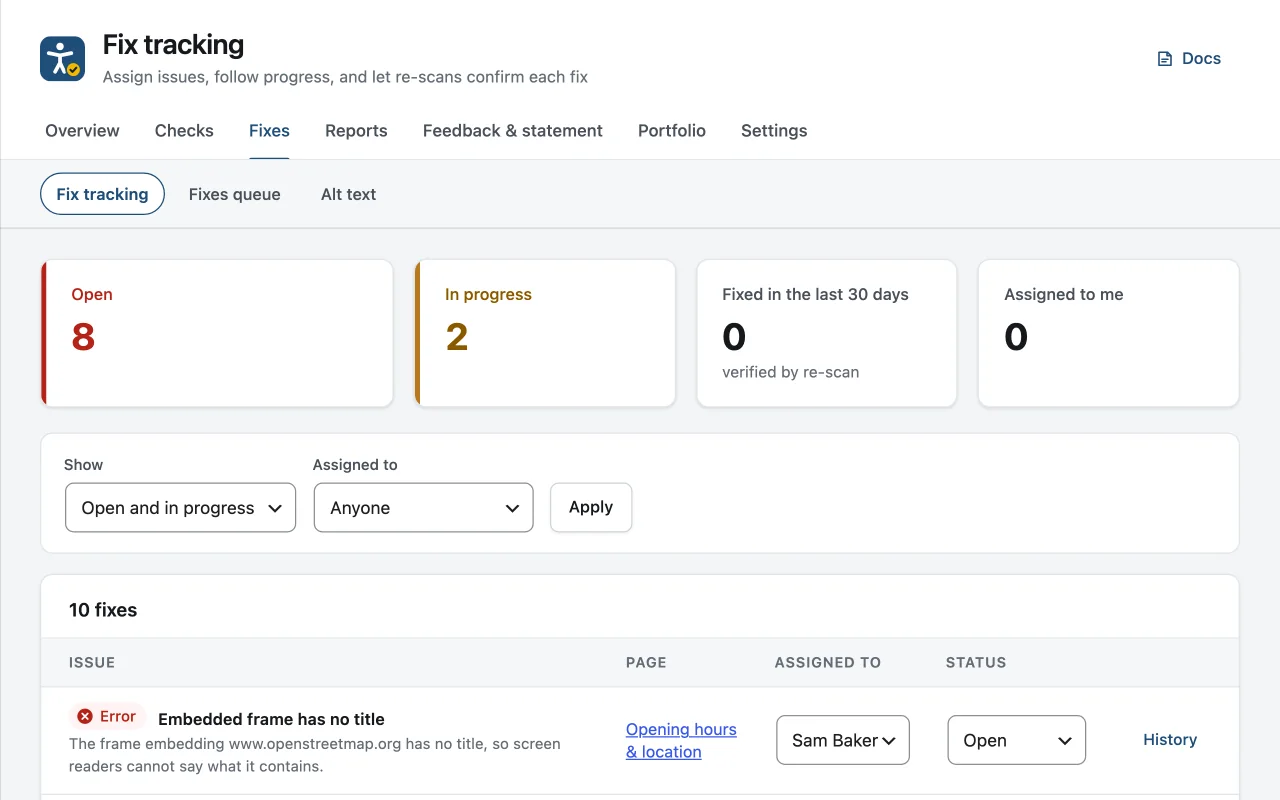
Fix tracking turns a finding into a task. A Track fix link appears on each issue in the block editor's Lumtera Accessibility sidebar and in the Content report. Choose who the fix is assigned to and the task is saved against that post. From then on the issue shows the task's status and assignee instead of the link, so everyone working on the post can see it is being handled.
Under Lumtera → Fixes → Fix tracking you see four counts: Open, In progress, Fixed in the last 30 days and Assigned to me. Below them you can filter by status and by Assigned to, then change a task's assignee or status straight from the table. History opens the full log for a task: who created it, who it was assigned to, each status change, fixes applied to it and what each re-scan found.
Verification runs after every scan of the post. If the issue is gone, the task becomes Fixed and the history says the fix was confirmed. If it comes back, the task reopens. If the markup changed but the same kind of problem is still on the post, the task follows the new finding and stays open. Dismissing the issue closes its task as Won't fix. A fix applied from the fixes queue, the editor or the Content report closes the task once its re-check confirms it.
Why does it matter?
Remediation stalls in spreadsheets: nobody knows who owns what, and "fixed" tickets quietly come back. You need tasks that know whether the problem is really gone.
What do you get?
- Statuses: open, in progress, fixed, won't fix, with assignees who get an email.
- Tasks close themselves when a re-scan no longer finds the issue, and reopen if it returns.
- A fix applied from the fixes queue closes its task once the re-check confirms it.
- Feedback about a page can become a task too.
- A full audit trail of every change.
How does it work?
-
Create tasks from issues
Use Track fix in the editor sidebar or the Content report.
-
Assign and work
Assignees get an email. Editors and administrators manage every task under Lumtera → Fixes → Fix tracking; authors see their own there as My fixes.
-
Verified automatically
The next scan marks the task fixed, or reopens it.
Who is it for?
-
Editorial teams
An editor assigns heading and image problems to the authors who wrote the posts, and each author gets an email with a link to the page.
-
Agencies showing progress
Fixed in the last 30 days counts only fixes confirmed by a re-scan, so the number you show a client is backed by the checks.
-
Feedback from visitors
Turn a reported barrier into a task on the page it is about, assigned to the person handling the request.
Good to know
How it behaves, what it needs, and where its limits are.
- Plans and access
- Included in every Pro plan. Editors and administrators see every task under Fixes → Fix tracking. Authors and contributors get My fixes there instead: the tasks assigned to them or on their own posts. Anyone can track issues on posts they can edit.
- Who can assign
- Editors can assign anyone who can edit that post, and the assignee gets an email. Authors can only take a fix themselves. Closing an error as Won't fix needs the same permission as dismissing it.
- What can become a task
- Findings in post content, and accessibility feedback about a page on your site. Tasks made from feedback are closed by a person, not by a re-scan. Findings from Page checks and from the Documents screen cannot be turned into tasks.
- Issue trackers
- A task can create an issue in GitHub, GitLab, Jira, Linear, Asana, ClickUp or Trello. When a fix from Lumtera is applied and verified, or undone, a comment is added to that issue in the background.
- Activity and evidence
- Task changes appear under Lumtera → Reports → Activity and can be sent to webhooks. Fixes a re-scan confirmed are added to the evidence log. Deleting a post permanently also deletes its tasks and their history.
Questions
Something else on your mind? Contact support
What happens when an issue is dismissed?
Its task is marked won't fix, and the change is recorded in the task history.
Can an author who is assigned a fix see it outside the editor?
Yes. Authors and contributors get a My fixes screen with the tasks assigned to them or on their own posts, as well as the assignment email and the task's status on the issue in the editor sidebar. The full Fixes screen stays with editors and administrators.
Can I mark a task Fixed by hand?
Yes. It shows as Marked fixed (not yet verified) until the next scan of the post. If the issue is gone, the fix is confirmed; if it is still there, the task reopens and the history records why. Only confirmed fixes count towards Fixed in the last 30 days.
More in “Catch regressions and fix at scale”
-
Pro
Email and Slack alerts
Hear about it when a publish adds new errors or feedback goes past its target, never twice for the same one, plus a Monday summary and a score history.
-
Pro
Compare scans
See what is new, what was fixed and what is still there between two scans, by check and by site part, with the likely cause marked.
-
Pro
Fixes queue: bulk fixes you review and approve
Propose the same fix on many pages at once — built-in fixes or text you write (and AI drafts, only if you connect an AI provider) — review every change, then apply and undo them in the background.
Fix tracking
Get it with Lumtera Pro
In every Pro plan. Personal is $149 a year. Pro installs alongside the free plugin, and your settings and results stay.
14-day refund (opens in a new tab)Keeps working if you don't renew