Test live pages Pro
Page checks for key pages and templates
Check many live pages in one run, at desktop and phone width, on the same audit engine as review mode, and keep every result for reports.
Updated for Lumtera 1.3.0 and Lumtera Pro 1.2.0.
Starts at 0:11: “Scheduled page checks”. Captions are on. Nothing loads from YouTube until you press play.
Overview
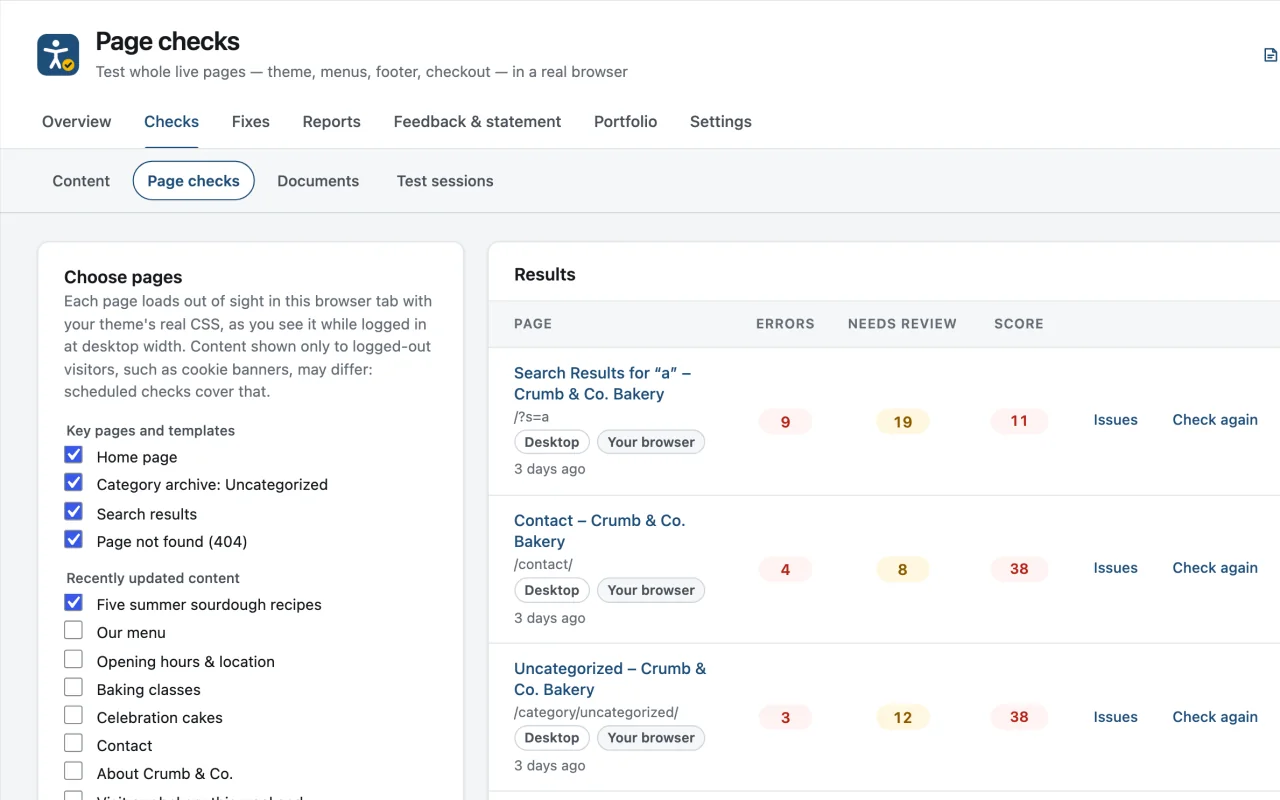
Page checks is a screen under Lumtera → Checks → Page checks. Where review mode checks the one page you are viewing, Page checks works through a list of pages in one run and stores each result. Each page loads out of sight in a same-origin frame in your own browser tab, in the free plugin's audit mode. The same audit engine that powers review mode measures it there, and your server then runs the content checks on the finished page, plus page-level checks for the title, language, a way to skip to the content, and zoom.
The Choose pages panel suggests key pages and templates: the home page, the blog page, your largest category archive, search results and a 404 page. On WooCommerce stores it adds Shop, Cart, Checkout and My account. Below them are your 20 most recently updated posts and pages. Tick the pages you need, add another page on the same site as a path such as /about/, and press Check selected pages. Turn on "Also check at phone width (390px)" to check each page a second time in a phone-sized frame, stored as its own Phone result.
At each width the engine measures text and non-text contrast from the theme's real CSS, target size, text spacing and reading order, then walks the page with the keyboard and tests menus, pop-ups, dialogs, tabs and carousels. At phone width it also narrows the frame to 320px to find sideways scrolling. At desktop width it adds hover, focus and pressed contrast and the slider check. Results lists each page worst first, with Issues, Check again and Remove, and says who ran the last check and when.
Why does it matter?
Review mode checks one page at a time and keeps nothing unless you save it. On a real site the same theme problems repeat across dozens of templates, and the pages that matter most, such as checkout, search results and the 404 page, are rarely the ones anyone opens.
What do you get?
- Key pages and templates suggested for you: home, blog, a category archive, search results and the 404 page, plus shop, cart, checkout and My account on WooCommerce stores.
- Contrast, target size, keyboard and widget tests from the same audit engine as review mode, so a finding reads the same in both places.
- An optional second check at phone width (390px), with sideways scrolling measured at 320px as WCAG asks.
- Hover, focus and pressed contrast, and a check for sliders that move on their own, on every Pro plan.
- Results kept per page and used in client reports, the conformance report (ACR) and scheduled checks.
How does it work?
-
Pick pages
Start from the suggested key pages and recent content, or add a path such as /about/. Turn on "Also check at phone width" if you want a phone result too.
-
Run the check
Each page loads out of sight in your own browser tab. The audit engine measures it there, and your server runs the content checks on the finished page.
-
Fix at the source
Each finding shows the markup involved and how to fix it. Colors and menus usually come from the theme or page builder, so fix them there.
Who is it for?
-
Theme and page-builder sites
Low-contrast buttons, menus and footers usually come from global colors in the theme or builder. Page checks shows them across every template at once, not one page at a time.
-
WooCommerce stores
Cart and checkout are suggested with a sample product added to your own cart session, so the checkout form is on the page. Form tests and signed-in checks go further.
-
Agencies before a launch
Check the key templates at desktop and phone width before a redesign is signed off. The results fill the Live page checks section of the client report.
Good to know
How it behaves, what it needs, and where its limits are.
- Plans and access
- Page checks, the phone-width check and the Forms card are included in every Pro plan. The Signed-in checks card needs an administrator: one role on every plan, more on Agency and Unlimited. The screen needs the same permission as the Lumtera reports, editors and administrators by default.
- Your own site only
- Only addresses on the site's own host and port can be checked. A page that refuses to load in a frame, or takes longer than 20 seconds to load, is reported instead of checked.
- What your browser sees
- Browser checks run as you, logged in, with the admin bar left out of the snapshot. Content shown only to logged-out visitors, such as a cookie banner, can differ; scheduled checks cover that view, and signed-in checks cover other roles. The frame keeps your browser's user agent, so a theme that sends phones different HTML is checked with its desktop HTML.
- Where results go
- Each page keeps a Desktop and, if you checked it, a Phone result. Results feed the client report, the conformance report (ACR), scheduled checks and, on the Growth plan and above, the consistency checks. Site-wide ignore rules apply to measured findings too.
- What still needs a person
- The keyboard walk and widget tests find common problems, but they do not replace testing with a keyboard and a screen reader yourself. A clean result means no automated issues were found, not that the page is accessible.
Checks you will see here
-
WCAG 1.4.3 · AAError
Text has low contrast on the live page
-
WCAG 2.5.8 · AANeeds review
Small, crowded click target
-
WCAG 1.4.10 · AANeeds review
Page scrolls sideways at this width
-
WCAG 2.4.7 · AANeeds review
No visible keyboard focus
-
WCAG 2.4.11 · AANeeds review
Sticky bar hides the keyboard focus
-
WCAG 1.4.11 · AANeeds review
Controls or icons are hard to see
-
WCAG 1.4.12 · AANeeds review
Text is cut off or overlaps when text spacing is increased
-
WCAG 2.4.3 · ANeeds review
Dialog or pop-up is hard to use with a keyboard
-
WCAG 2.4.1 · ANeeds review
No working way to skip to the main content
-
WCAG 1.4.4 · AAError
Zooming is disabled
Questions
Something else on your mind? Contact support
Is my site sent to a cloud scanner?
No. Pages load in your own browser while you are logged in, and the rest runs on your own server. Only pages on your own site can be checked.
How is this different from review mode?
Both use the same audit engine. Review mode checks the page you are on. Page checks runs many pages at once, including archives, search results and the 404 page, at desktop and phone width, stores the results and hands pages to scheduled checks.
Does a page check change anything on my site?
No content is changed. The engine opens menus and moves focus inside a hidden frame that is thrown away afterwards. The one side effect is on WooCommerce: checking the suggested Cart or Checkout adds a sample product to your own cart session.
Why does a scheduled result show older contrast findings?
A scheduled check has no browser, so it cannot measure contrast or target size. It keeps those findings from your last browser check and says when they were measured. Press Check again to refresh them.
More in “Test live pages”
-
Free
Whole-page review
Check a page the way visitors see it — theme, header, menus, footer and page-builder output — with {page_checks} checks for contrast, target size, keyboard and widgets.
-
Free
Keyboard walk and widget tests
Review mode's Keyboard tab numbers every Tab stop on the page, flags focus you cannot see, and opens menus, dialogs and tabs from the keyboard.
-
Free
Screen reader preview
See roughly what a screen reader lists on a page: headings, landmarks, links and form fields, plus the whole page in reading order.
Page checks for key pages and templates
Get it with Lumtera Pro
In every Pro plan. Personal is $96.85 a year. Pro installs alongside the free plugin, and your settings and results stay.
14-day refund (opens in a new tab)Keeps working if you don't renew