
Learner Calendar
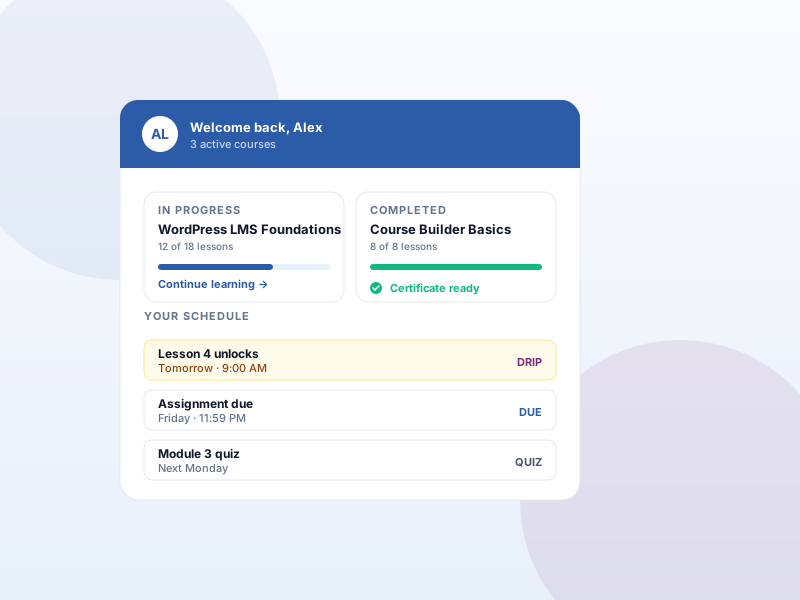
Show each learner a dated schedule of their enrollments, upcoming drip unlocks, and assignment due dates.
Why this matters
A learner with three courses, drip unlocks, and assignment deadlines spread across them needs one place to see what's next. Without a calendar, that info lives in scattered course pages.
What you get
- Learners see their schedule on their account dashboard — enrollments, upcoming drip unlocks, assignment due dates.
- The same data is exposed over the REST API for custom widgets or external calendar views.
- Lesson unlock dates only appear when drip rules are configured for those lessons.
What it unlocks
-
"Your schedule" on My Account
Logged-in learners see a dated list on their account overview — enrollments, upcoming drip unlocks, and assignment due dates sorted by date.
-
REST API feed
The same calendar data is exposed over the Sikshya REST API so developers can power custom widgets, a full calendar view, or external dashboards.
-
One-stop deadline view
Learners juggling several enrollments don't have to open each course — they see what's due and what unlocks next in one place.
How it works
-
1
Enable the Calendar add-on
Activate Calendar under Sikshya Add-ons. A "Your schedule" section appears immediately on every learner's My Account overview.
-
2
Source the data
Enrollments and assignment due dates populate automatically. For lesson unlock dates, also enable Content Drip and set drip rules on lessons.
-
3
Optional — build a custom view
Need a full month-grid calendar? Read the same data from the learner calendar REST endpoint and render it inside your theme.
Frequently asked
Does this work without Content Drip?
Partially. Enrollment dates and assignment due dates always work. Lesson unlock dates require the Content Drip add-on with drip rules configured for those lessons.
Keep exploring
Ready to ship Learner Calendar?
Activate the Sikshya Pro Starter tier to unlock this feature. The free plugin handles everything else.