

Want to start an online news portal in 2026 but don’t know where to begin? You’re in the right place. This is the step-by-step tutorial we wish we’d had when we launched our first news site — covering everything from picking a niche to installing the right theme to publishing your first post and getting it indexed by Google.
The fastest, lowest-cost stack for an online news website in 2026 is WordPress + MagazineNP. Total setup time: an afternoon. Total cost: under $100 for the first year (domain + hosting). Total ongoing cost if you stay on the free theme tier: $0/month software, just your hosting bill. This guide walks you through the whole thing.
Should you start an online news portal in 2026?
Quick reality check before you commit ten hours to setup. An online news portal works if:
- You have a niche — a specific topic, region, or community you can cover with authority. (“General news” is not a niche; “WordPress development news” or “Bay Area cycling news” is.)
- You can publish consistently — 3–5 short posts a week minimum for the first 6 months, ideally daily.
- You’re willing to build distribution — SEO + an email list + a couple of social channels. A news site with no traffic source is a journal.
- You have a monetization plan — ads (Adsense), sponsorships, paid newsletters, affiliate, paid memberships. Pick one to start.
If you can check three out of four, keep reading. If you can’t, build the muscle on a free Medium account first — much cheaper to test the writing cadence there before paying for hosting.
What you need to start an online news portal (the full stack)
| What | Recommendation | Cost |
|---|---|---|
| Domain name | Namecheap, Cloudflare Registrar, Porkbun | $10–15/yr |
| WordPress hosting | Hostinger, SiteGround, Cloudways | $3–15/mo |
| CMS | WordPress (self-hosted) | Free |
| Theme | MagazineNP (free, 10,000+ installs) | Free / $49/yr Pro |
| SEO plugin | Rank Math | Free / $59/yr |
| Caching | WP Rocket, LiteSpeed Cache (free if on LiteSpeed host) | Free / $59/yr |
| Email list | Mailchimp, Brevo, ConvertKit | Free up to ~500 subs |
| Image protection (if running original photography) | Ultimate Watermark | Free |
Total first-year cost on the cheap path: ~$60–100. Total ongoing cost if you stay free-tier: $3–15/month for hosting. Everything else is optional.
Step 1: Pick a niche for your news portal
The single biggest predictor of whether a news portal grows is niche specificity. “Tech news” is too broad — you’ll compete with TechCrunch, The Verge, Engadget, Ars Technica. “Open-source AI tooling news” is narrow enough that you can become the authority in 12 months.
Three frameworks for picking a niche:
- Geographic — your city, district, neighborhood, country. (“Kathmandu transit news”, “South Devon sailing news”.)
- Industry vertical — a profession, technology stack, or hobby. (“WordPress plugin development news”, “indie game dev news”.)
- Community — a specific group of people with shared interests. (“Vegan parenting news”, “RV digital nomads news”.)
Test it with the “30-headline rule”: can you brainstorm 30 specific story angles right now? If yes, the niche is rich enough. If you struggle past 10, it’s too narrow.
Step 2: Buy a domain + hosting
Pick a short, brandable domain. Avoid hyphens. The .com is still the gold standard; .news, .org, .co work too if .com is taken. Country TLDs (.co.uk, .com.np, .com.au) are fine if you’re serving a specific region.
For hosting, a managed WordPress host beats shared hosting for news sites because of traffic spikes (a viral post can 10x your daily visitors overnight). See our guide on best WordPress hosting services for the full comparison. For day-one, Hostinger’s $3/month plan is the cheapest viable option; Cloudways’ $14/month plan handles 50K+ monthly visits comfortably.
Step 3: Install WordPress
Almost every WordPress host ships a one-click WordPress installer. From your hosting dashboard, find “Install WordPress” → enter your site title and admin credentials → done. Five minutes.
Once installed, log into your WP admin at yoursite.com/wp-admin. You’ll see the default Twenty Twenty-Five theme — we’re replacing it next.
Step 4: Install MagazineNP — the news-portal-ready WordPress theme
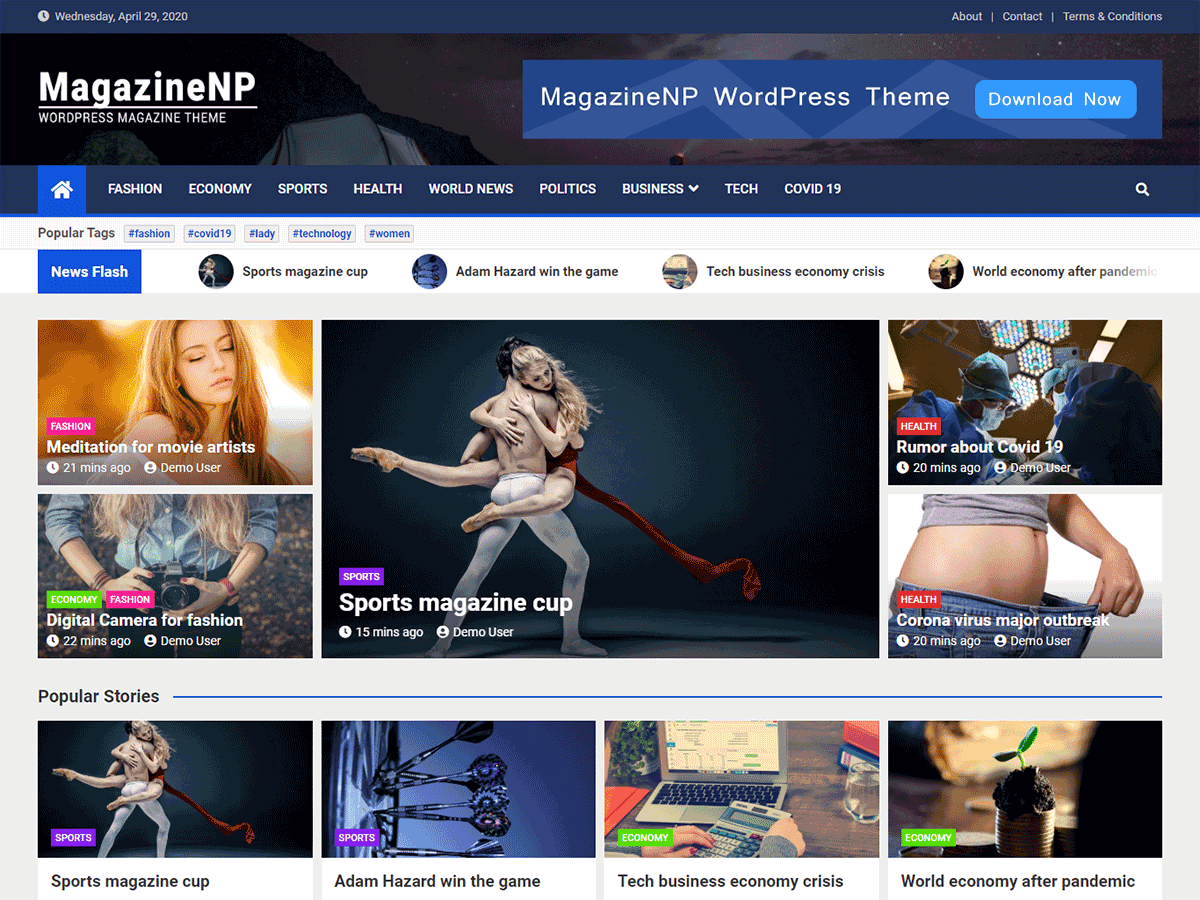
This is where most “how to start a news website” tutorials hand-wave. Theme choice is the single biggest decision you’ll make — it determines layout, mobile speed, ad-readiness, SEO defaults, and how much CSS work you’ll do post-launch. For a news portal we recommend MagazineNP by MantraBrain — purpose-built for news, magazine and editorial sites.
Why MagazineNP wins this category:
- Built specifically for news/magazine sites — not a generic blog theme with editorial fonts. News ticker, featured slider, tabbed widgets, category-driven homepage layout, breaking-news bar all built in.
- Free on the official WordPress.org directory — 10,000+ active installs, 4.5/5 average review. No license key, no nag screens, no time-limited trial.
- Customizer-driven setup — enable the magazine-style homepage with one click from WP Customizer (no separate homepage editor required).
- 8+ pre-built starter sites — news, sports, tech, lifestyle, recipe, agency, RTL, Gutentor-block versions. One-click import gets you to a designed site in minutes.
- Lighthouse 90+ on mobile — clean codebase, lazy-loaded images, no bundled jQuery.
- WooCommerce compatible — sell merch, paid subscriptions, premium articles alongside your free content.
- Page-builder friendly — works with Elementor, Gutentor (Gutenberg block library), Beaver Builder.
- Translation + RTL ready — full WPML/Polylang compatibility, dedicated RTL stylesheet.
- Active development — built by MantraBrain (15,000+ sites running their themes), maintained continuously.
Install MagazineNP in 60 seconds
- In WP Admin: Appearance → Themes → Add New
- Search for “MagazineNP”
- Click Install, then Activate
- A welcome screen prompts you to import a starter site — pick one matching your niche (news, sports, magazine, etc.)
- Done. Refresh your homepage — you’re live with a designed news layout.
Download MagazineNP free → View demo sites See MagazineNP Pro ($49/yr)
When to upgrade to MagazineNP Pro
MagazineNP Free runs production news sites. MagazineNP Pro ($49/year single site, $99 lifetime) adds advanced typography, advanced color options, breadcrumbs, mid-bar layout, archive page customization, two full-width sidebars, footer credit removal, multi-column footer widgets, and an advanced Post Master widget. Upgrade if you want the premium starter sites or the deeper customization controls — the free tier is enough to launch.
Alternative: Magazineplus (also by MantraBrain)
If MagazineNP’s design doesn’t match your taste, MantraBrain’s Magazineplus is the same engineering team’s alternative design — also free on WP.org, also magazine-native, with a more compact layout and a different starter-site library. Either works. For the full comparison see our best free WordPress magazine themes guide.
Step 5: Configure your starter site
After MagazineNP imports a starter site, customize it in Appearance → Customize:
- Site Identity — upload your logo, set site title and tagline, add a favicon.
- Colors — pick a brand color (typically your logo color). Default styles match it across buttons, links, and headers.
- Typography — pick a heading font and body font. For news sites, pair a serif heading (Playfair Display, Lora) with a sans-serif body (Inter, Open Sans).
- Header layout — choose logo position (left, center, split nav), sticky vs static, transparent-on-hero options.
- Featured slider — assign which category drives the homepage slider (typically your “Featured” or “Top Stories” category).
- News ticker — enable, assign a category, set scroll speed.
- Footer — add widget areas (recent posts, social links, newsletter signup, ad space).
Customizer changes live-preview before saving, so you can iterate fast without breaking the live site.
Step 6: Install essential plugins for a news portal
Themes handle design. Plugins handle behavior. For a news portal, the minimum viable stack:
- SEO: Rank Math — schema markup, sitemap, social cards, redirects. Free tier is enough to start.
- Caching: If your host runs LiteSpeed, LiteSpeed Cache is free and excellent. Otherwise WP Rocket ($59/year) is worth it.
- Image protection: If you’re publishing original photography or graphics, Ultimate Watermark auto-stamps your logo onto every uploaded image, deterring scraping. See our best WordPress watermark plugins comparison.
- Email list: Mailchimp For WordPress (free) or Brevo plugin. Capture newsletter signups from day one.
- Comments/Engagement: The default WordPress comments are fine. If you want threaded discussions, consider wpDiscuz or Disqus.
- Spam protection: Akismet (free for personal sites).
- Backup: UpdraftPlus (free). See our best backup plugins guide.
- Analytics: Site Kit by Google — official Google Analytics + Search Console integration.
Resist the temptation to install 30 plugins on day one. Each plugin is a future maintenance cost. Start with these 6–7 and add more only when you have a specific need.
Step 7: Set up categories and publish your first posts
Before posting, create your category structure in Posts → Categories. For a news portal, plan 5–8 top-level categories. Examples:
- News portal for WordPress development: Plugins, Themes, Core, Tutorials, Community, Reviews
- News portal for a city: Politics, Business, Sports, Culture, Transport, Weather
- News portal for a profession: Industry News, Tools, Career, Opinion, Interviews, Events
Now publish your first 10 posts. Don’t wait for the site to be “perfect.” A news portal with three posts looks abandoned; a portal with 10 posts looks alive. Aim for 300–800 words per post for the first batch — short, focused, niche-specific.
Step 8: Monetize your online news portal
Pick one monetization channel for the first 6 months. Splitting your focus across all of them at launch slows down all of them.
- Google AdSense — the path of least resistance. Apply once you have 25+ original posts and steady traffic. See our best WordPress AdSense plugins guide for placement.
- Sponsorships — best for niche news sites with engaged audiences. Even at 10K monthly visitors, niche sponsors will pay $200–500 per placement.
- Affiliate — recommend tools, services, products relevant to your niche. Mantrabrain’s own affiliate program covers themes and plugins.
- Paid newsletter / Substack-style — gated premium edition. Works best with niche professional audiences.
- Paid memberships — premium articles, archives, community access. Use WooCommerce Memberships or Paid Memberships Pro. For invoicing the memberships, pair with Easy Invoice for auto-generated PDF invoices.
- Direct ad sales — sell banner placements yourself once you have traffic. Higher CPM than AdSense if you have a clean niche audience.
Step 9: SEO and speed optimization
News content lives or dies by Google traffic. Three things matter most:
- NewsArticle schema markup — Rank Math handles this automatically when you set the schema type on posts.
- Sitemap submission — submit your XML sitemap to Google Search Console + Bing Webmaster Tools on day one. Add a News Sitemap if you’re publishing news content frequently (Rank Math Pro generates this).
- Core Web Vitals — Lighthouse mobile score above 90. MagazineNP starts you above 90; the main risks are heavy ads, third-party scripts, and unoptimized images.
For deeper SEO guidance, see our WordPress SEO tips for beginners guide.
Step 10: Launch and promote your news portal
The hard part of running a news portal isn’t building it — it’s getting people to read it. Three distribution channels worth investing in:
- SEO — write for specific search queries in your niche. A 12-month consistent posting cadence beats a 3-month sprint.
- Email newsletter — your single most owned distribution channel. Capture emails from day one with an inline signup form on every article.
- One social platform — pick the platform your niche lives on (Twitter/X for tech, LinkedIn for business, Reddit for hobbyist niches, Instagram for visual niches). Don’t spread thin across all of them.
Frequently asked questions about starting a news portal
How much does it cost to start an online news portal?
Year-one cost on the cheapest viable stack: $60–100 (domain $10–15 + hosting $36–180 + everything else free). Ongoing cost if you stay on free-tier software: just your hosting bill ($3–15/month). The WordPress + MagazineNP combination is genuinely free — no time-limited trial, no feature paywall on the homepage layout, no nag screens.
Which is the best WordPress theme for a news portal?
MagazineNP is our pick for 2026 — 10,000+ active installs, 4.5/5 average review, eight one-click starter sites, native news ticker / featured slider / tabbed widget combo, Lighthouse 90+ on mobile, free on the WordPress.org directory. For a more compact alternative by the same team, see Magazineplus. Both work for news, sports, tech, lifestyle, and recipe portals.
Can I start an online news portal without coding?
Yes — everything in this guide is no-code. WordPress + MagazineNP + WP Customizer covers theme setup, layout, colors, fonts and widget placement without touching CSS. Plugin installs are point-and-click. You only need code knowledge if you want deep custom design changes beyond what the Customizer exposes.
How long does it take to start an online news portal?
From “I have nothing” to “live site with 5 published articles”: one afternoon. Domain purchase (10 min), hosting setup + WordPress install (30 min), MagazineNP install + starter site import (10 min), brand customization (1 hour), essential plugins (30 min), category setup (15 min), write 5 short posts (2–3 hours). That’s it. Getting traffic takes months; getting launched takes hours.
How do I monetize an online news portal?
Google AdSense is the easiest first revenue channel (apply at 25+ posts + steady traffic). Sponsorships and direct ad sales pay more per impression but require sales effort. Paid newsletters and memberships work best for niche professional audiences with high engagement. Affiliate commissions work for review-heavy or tutorial-heavy news sites. Most successful news portals layer 2–3 channels by year two.
Do I need a license to start an online news website?
In most jurisdictions, no — publishing a news website is the same as publishing a personal blog from a legal standpoint. Press credentials (for accessing government press conferences, etc.) are a separate thing and earned through reputation, not registration. Check local press laws if you’re in a heavily regulated jurisdiction. Standard defamation, copyright, and privacy laws apply wherever you publish.
How often should I publish on a news portal?
For SEO and reader retention: minimum 3–5 posts per week, ideally daily. Google’s news algorithms favor sites with fresh content and consistent cadence. If you can’t sustain daily, set a fixed schedule (Mon/Wed/Fri) and stick to it for 12 months before evaluating.
Can I run a news portal alongside a regular WordPress blog?
Yes. The news portal is just a WordPress site with a magazine-style theme. You can publish news articles, opinion pieces, long-form blogs, and tutorials side-by-side. MagazineNP handles both formats — the homepage layout features news, while individual posts can be either news-style or blog-style depending on your template choice.
Final verdict: launch your online news portal this weekend
Starting an online news portal in 2026 is technically the easiest it’s ever been. The stack is mature, the costs are minimal, and the design templates are free and excellent. The hard parts — picking a niche, sustaining a publishing cadence, building distribution — are the same hard parts they’ve always been. No theme or plugin will solve them for you.
If you want our recommended stack: install WordPress, install MagazineNP, pick a starter site, set brand colors in the Customizer, install Rank Math + Site Kit, publish your first 10 posts, submit your sitemap. Total time: a weekend. Total cost: under $100 for the first year. You’re live.
Download MagazineNP free → View 8 starter site demos MagazineNP Pro from $49/yr