
Looking for the best WordPress freelancer themes in 2026 to build your portfolio, showcase services, and get paid? A freelancer site has a few specific jobs: persuade a stranger you’re worth their money, present your work, capture inquiries, and ideally let prospects pay you online. The right theme handles all four; the wrong one makes you fight every layout choice.
This guide is the shortlist of 6 WordPress freelancer themes that survived our testing — portfolio-first design, services sections, contact forms, and (critically) payment-ready for freelancers who sell digital products, templates, or service packages alongside hourly work.
Quick answer: for freelancers who sell digital products + service packages (templates, presets, consultations), Agency eCommerce by MantraBrain. For pure portfolio + services brochures, Sydney or OnePress. For maximum flexibility, Astra.
Quick comparison: best WordPress freelancer themes (2026)
| Theme | Best for | Sells digital products? | Active installs |
|---|---|---|---|
| Agency eCommerce (our pick) | Freelancers selling templates/services | Yes (WooCommerce-native) | 2,000+ (5.0★) |
| Sydney | Photographer/designer freelancers | WooCommerce compatible | 100,000+ |
| OnePress | One-page freelancer landing | WooCommerce compatible | 100,000+ |
| Astra | Multipurpose flexibility | WooCommerce-optimized | 1,000,000+ |
| Hestia | One-page material design | WooCommerce compatible | 100,000+ |
| Kadence | Modern block-editor freelancers | WooCommerce-ready | 500,000+ |
What to look for in a WordPress freelancer theme
- Portfolio section. Grid, masonry, or filterable showcase of your past work. This is the centerpiece of a freelancer site.
- Services section. Cards or grid for the 3–6 services you offer, with pricing or “start at” indicators.
- About / bio section. Your story, credentials, why hire you.
- Testimonials. Social proof from past clients.
- Contact form. Lead capture for prospects who want to discuss.
- Payment-ready. If you sell digital products (templates, presets, ebooks, audio packs) or productized services (3-hour consultation, audit package), the theme should pair with WooCommerce cleanly.
- Blog section. SEO traffic for freelancers comes from helpful content. The theme should treat the blog well.
- Mobile-first. Most prospects discover freelancers on phones (LinkedIn, Twitter, Google).
1. Agency eCommerce — best for freelancers selling digital products + services
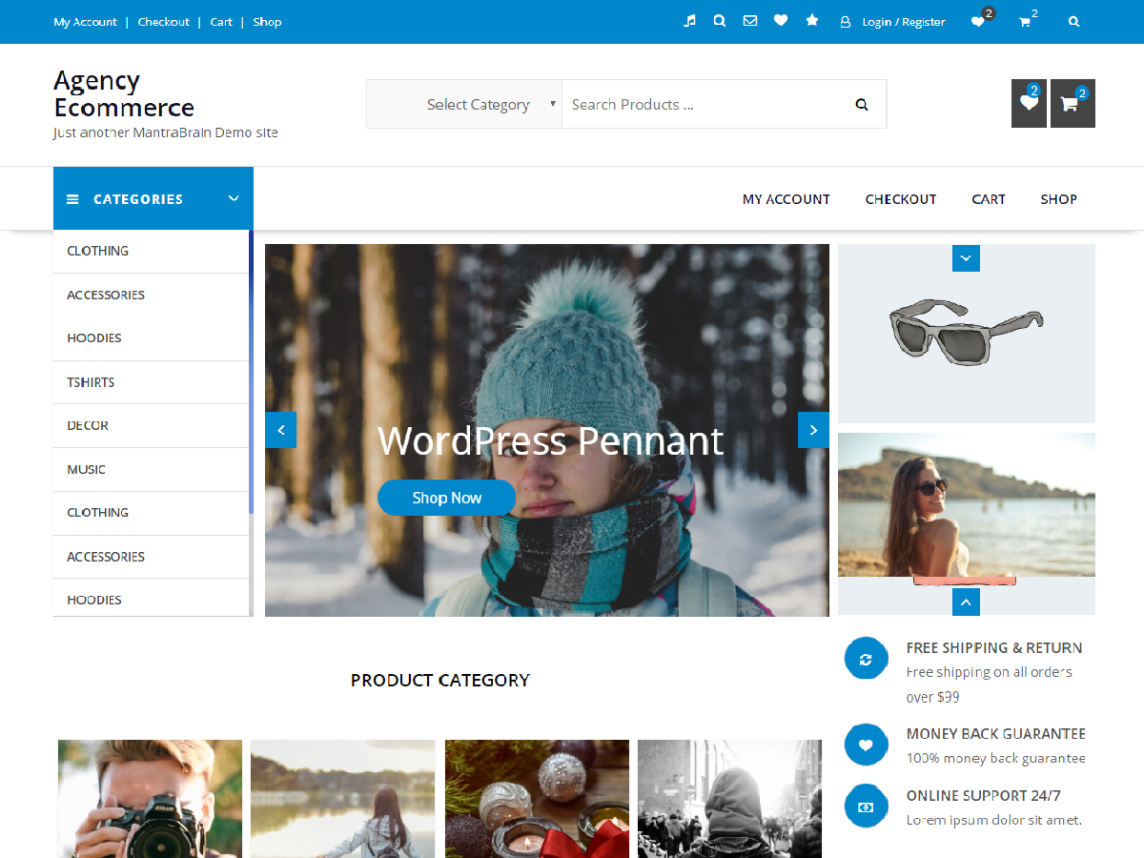
Agency eCommerce by MantraBrain is our pick for freelancers who treat themselves as a business — not just selling hours, but also packaging templates, presets, ebooks, audio sample packs, or productized service packages. WooCommerce-native cart, checkout, and product pages mean you can sell anything from the first day.
- WooCommerce-native: cart, checkout, product, account templates pre-styled
- WooCommerce Featured Slider for highlighting service packages
- Product + Category widgets for portfolio-as-products layout
- One-click demo importer with agency/freelancer starter designs
- Page-builder compatible (Elementor, Gutenberg)
- Mobile responsive, Lighthouse 90+ on mobile
- 5.0/5 review average on WordPress.org
- Free forever, no license key
Why Agency eCommerce wins for freelancers: most freelancer themes are pure brochures — portfolio + contact form. The day you want to sell a $97 template or a $300 audit package, you have to bolt WooCommerce onto a theme that wasn’t designed for it. Agency eCommerce starts you with the eCommerce work already done. Pair it with the Easy Invoice plugin for auto-PDF invoices on every freelance transaction.
Download Agency eCommerce free → View demo Agency eCommerce Pro
2. Sydney — photographer + designer freelancer hybrid
Sydney by aThemes (100,000+ active installs) is a popular business-focused theme that works beautifully for visual freelancers — photographers, designers, illustrators, videographers. Slider-driven hero, services section, portfolio gallery, contact form.
- 100,000+ active installs
- Slider-driven hero section
- Services / portfolio / contact sections
- Customizer-driven setup
- Elementor + WooCommerce compatible
3. OnePress — one-page freelancer landing
OnePress by FameThemes (100,000+ active installs) is the go-to free one-page theme for freelancers, consultants, and personal brands. Hero + about + services + portfolio + testimonials + contact, all controlled from the Customizer. Perfect if you want a single-scroll page that does everything.
- 100,000+ active installs
- One-page layout with section anchors
- Customizer-driven — no page builder required
- WooCommerce compatible
- Translation ready
4. Astra — maximum flexibility
Astra by Brainstorm Force (1,000,000+ active installs). Multiple freelancer/personal brand starter templates in the Starter Templates library. Works with every major page builder. Lighthouse 92+ on mobile.
- 1,000,000+ active installs
- Multiple freelancer starter templates
- Header + footer builder in free tier
- Lighthouse 92+ on mobile
- WooCommerce-optimized
5. Hestia — one-page material design
Hestia by ThemeIsle (100,000+ active installs). Material Design-inspired one-page theme — clean, modern, opinionated. Particularly strong fit for designers, developers, and consultants who want a confident, polished look without much customization.
- 100,000+ active installs
- Material Design aesthetics
- One-page layout
- WooCommerce compatible
- Customizer-driven
6. Kadence — modern block-editor freelancer
Kadence by Kadence WP (500,000+ active installs). Modern Gutenberg-first design with freelancer/portfolio starter templates. Lighthouse 95+ on mobile. Best if you prefer the WordPress block editor over page builders.
- 500,000+ active installs
- Lighthouse 95+ on mobile
- Freelancer + portfolio starter templates
- Header + footer builder in free tier
- Block-editor-first
Getting paid as a freelancer: the invoicing layer
Whatever theme you pick, freelancers eventually need to send invoices. PDF invoices for hourly work, fixed-price project deposits, productized service packages, retainer agreements. Most themes don’t handle this; you need a plugin (or a SaaS tool).
If you already run WordPress, pair your freelancer theme with Easy Invoice by MatrixAddons. Free forever on WordPress.org (unlimited invoices, PayPal gateway, PDF generation, 10 templates, client management — no caps, no trial), with optional Pro tiers from $79/yr or $199 lifetime that unlock 9 payment gateways (Stripe, Square, Razorpay, Paystack, etc.), recurring billing, automated reminders, client portal, and two-way QuickBooks/Xero/FreshBooks sync. Auto-generates branded PDF invoices on every WooCommerce transaction, so when a client buys your $300 audit package or $97 template, they automatically get an invoice with multi-tax compliance (VAT, GST, sales tax) and credit-note handling.
If you don’t run WordPress (or you’re comparing self-hosted vs SaaS), see our broader guide: best invoice software 2026 — 10 tools ranked by 5-year cost. Spoiler: for freelancers running 50+ invoices a month, the Easy Invoice lifetime license at $199 beats FreshBooks ($1,780 over 5 years) and QuickBooks ($2,100 over 5 years) by 85–95% — with the same core invoicing capability.
Get Easy Invoice → Compare invoice software Compare WP invoicing plugins
Which WordPress freelancer theme should you pick?
- Sell digital products or service packages? → Agency eCommerce.
- Photographer / designer / visual freelancer? → Sydney.
- One-page personal brand? → OnePress or Hestia.
- Maximum flexibility, multipurpose? → Astra.
- Block-editor-first build? → Kadence.
- Critical regardless of theme: Easy Invoice for PDF invoices (free on WP.org, $199 lifetime for Pro).
FAQ
What is the best WordPress theme for freelancers in 2026?
For freelancers selling digital products + service packages: Agency eCommerce. For visual freelancers (photographers, designers): Sydney. For one-page personal brands: OnePress or Hestia. For multipurpose flexibility: Astra.
Can I sell digital products and service packages with a freelancer theme?
Yes — pair the theme with WooCommerce (free). Agency eCommerce is WooCommerce-native, so cart, checkout, and product pages are pre-styled. For invoices on every transaction, install Easy Invoice.
Do freelancer themes work with Elementor?
Yes — all 6 themes in this guide are Elementor-compatible. Astra and Kadence have the deepest Elementor integration; Sydney and Agency eCommerce work well with Elementor for custom service pages.
How much does a freelancer website cost to run?
Year-one minimum: ~$60–150 (domain $12 + hosting $36–120 + free theme + free plugins). Add a one-time $199 if you upgrade to Easy Invoice Lifetime for Pro features. Compared to Squarespace ($192–$432/yr + 0–3% transaction fees) or FreshBooks invoicing on top ($356/yr), the WordPress route saves $300–$600+/year over 5 years and gives you full ownership.
What plugins do freelancers need beyond the theme?
Essentials: WPForms or Contact Form 7 (contact forms), Rank Math (SEO), WooCommerce (if selling), Easy Invoice (PDF invoices), Akismet (spam), UpdraftPlus (backups).
Final verdict
If you’re a serious freelancer who treats yourself as a business — selling templates, presets, audit packages, retainers, productized services alongside hourly work — install Agency eCommerce + Easy Invoice + WooCommerce. You’ll have a complete freelancer business website (portfolio, services, sales, invoicing) live in an afternoon. Total cost year one: under $150 — and if you grab the $199 lifetime Easy Invoice Pro, you’ll never pay for invoicing again.
Related reading
- Best invoice software 2026: 10 tools ranked — SaaS vs self-hosted comparison for freelancer invoicing
- Best free ecommerce WordPress themes (2026)
- Best WordPress invoicing plugins (2026)
- Best free WordPress themes (2026) by niche
- Best WooCommerce extensions (2026)