

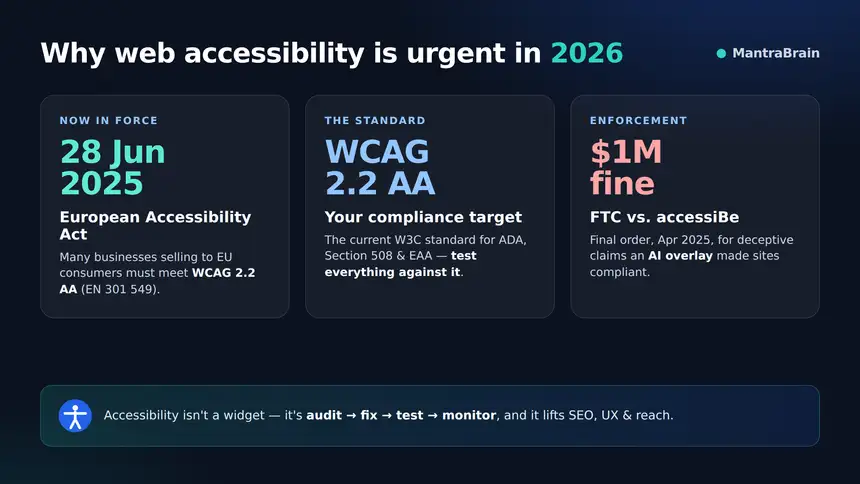
Web accessibility stopped being optional in 2026. The European Accessibility Act (EAA) reached its enforcement date on 28 June 2025, extending accessibility obligations to many private businesses that sell products or services to EU consumers — e-commerce stores, banking, transport, e-books and more — all aligned to EN 301 549 and WCAG 2.2 Level AA. In the United States, ADA Title III lawsuits keep climbing, and in a watershed moment the FTC fined the overlay vendor accessiBe $1,000,000 (complaint January 2025, final order April 2025) for deceptive claims that an AI widget could make any website compliant.
Beyond the legal pressure, accessibility is simply good business: it overlaps directly with SEO (semantic HTML, alt text, headings, contrast), improves UX for everyone, and expands your reach — roughly 1 in 4 US adults lives with a disability. The message of this guide is simple and, unfortunately, uncommon among affiliate-driven “best plugin” lists: real accessibility comes from finding and fixing problems in your content and code — not from bolting a JavaScript “overlay” widget onto your site. We lead with audit and remediation tools, and we cover overlay widgets honestly, including the legal reality.
Why trust MantraBrain? We build and maintain WordPress plugins ourselves — including the Yatra travel booking plugin — so we live with WordPress markup, editors and page builders every day. This roundup is neutral and merit-based, with no paid placement. We test tools hands-on and rank on genuine expertise, distinguishing real audit and remediation tools from JavaScript overlays that promise compliance they cannot deliver.
Quick verdict: the best WordPress accessibility plugins in 2026
| Plugin | Best for | Type | Price | Rating |
|---|---|---|---|---|
| Equalize Digital Accessibility Checker | Best overall — real WCAG 2.2 auditing | Audit + fix | Free – $190+/yr | 4.9 |
| WP Accessibility (Joe Dolson) | Best free theme-level fixes | Theme/markup fixes | Free | 4.8 |
| Editoria11y Accessibility Checker | Best real-time author checker | Real-time content checks | Free | 5.0 |
| Sa11y | Best lightweight content QA | Content QA | Free | 5.0 |
| Web Accessibility by Elementor (“Ally”) | Most popular all-in-one | Widget + scanner | Free+ | 2.9 |
| AudioEye | Managed (automated + human) service | Managed service / overlay | From ~$199/mo | Mixed |
| UserWay | Popular accessibility widget | Widget / overlay | Freemium | 4.0 |
Why we don’t recommend accessibility overlays as a compliance shortcut
An accessibility “overlay” is a snippet of JavaScript you paste onto your site that tries to patch pages at runtime — adding a floating toolbar and rewriting parts of the page in the visitor’s browser. It sounds magical: one line of code and you’re “compliant.” In reality, overlays do not fix the underlying HTML or design problems, they can conflict with the assistive technology (screen readers, browser tools) that people already rely on, and — critically — they have not satisfied courts or regulators.
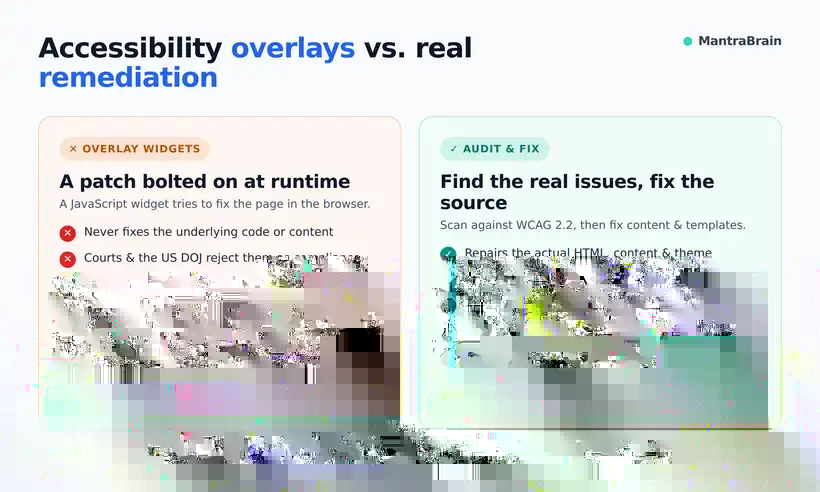
- The FTC fined accessiBe $1,000,000. The complaint (January 2025) and final order (April 2025) found the company made deceptive, unsubstantiated claims that its AI overlay could make any website WCAG compliant.
- Courts and the DOJ reject overlays as compliance. US courts have repeatedly ruled that an overlay does not equal ADA compliance, and the Department of Justice has stated overlays do not satisfy the ADA.
- Overlays attract lawsuits. In one analysis, roughly 22.6% (456 cases) of ADA web-accessibility lawsuits in a recent period targeted sites that had an overlay installed. The widget did not prevent litigation.
- Hundreds of accessibility professionals signed the Overlay Fact Sheet. The Overlay Fact Sheet documents that overlays do not achieve compliance and can introduce new barriers.
A usability toolbar (font resizing, contrast modes) can be a pleasant extra for some visitors, but it is not compliance and it won’t stop a lawsuit. The overlay category also carries cautionary tales worth naming: accessiBe is the vendor the FTC penalized for overpromising, and All in One Accessibility (Skynet Technologies) was closed on WordPress.org in June 2026 for a guideline violation — we mention both as examples and recommend neither. The durable path is unglamorous but effective: audit → fix content and code → manually test with real assistive tech → publish an honest accessibility statement → monitor over time.
What to look for in an accessibility plugin
- Audit coverage against WCAG 2.2. The tool should test real success criteria, not just cosmetics. More meaningful checks (and fewer false claims) beats a flashy widget.
- In-editor vs. site-wide scanning. In-editor checks catch problems as authors write; site-wide scans find issues across templates, archives and custom post types.
- Automated fixes done responsibly. Some fixes (skip links, focus outlines, form labels) can be safely automated at the code level. Be wary of anything that claims to “fix everything” at runtime.
- Privacy. Server-side scanning keeps your data on your site; some services route content through third-party APIs or collect visitor data.
- Author-friendliness. Plain-language explanations help non-technical editors fix issues themselves.
- Real support and honest limits. The best vendors are candid that a plugin assists compliance — it does not guarantee it.
How we evaluated
We prioritised tools that run real WCAG 2.2 checks rather than marketing claims, tested them hands-on inside the WordPress editor and on live pages, and considered install base and user ratings as signals (not gospel). Above all, we weighted honesty about limitations: a tool that helps you find and fix problems is worth more than one that promises automatic compliance it cannot deliver. There is no paid placement in this list.
The best WordPress accessibility plugins, reviewed
1. Equalize Digital Accessibility Checker — Best overall
Equalize Digital Accessibility Checker is our top pick because it does the thing that actually matters: it audits your content against WCAG in the place you edit it. Scans run inside the editor against 40+ WCAG 2.2 checks, with front-end highlighting so you can see exactly where each issue lives. Everything runs server-side with no API limits, so your content never leaves your site. It’s made by Equalize Digital (Amber Hinds), a well-known accessibility agency, and it’s a genuine developer and agency favourite. Learn more at equalizedigital.com.
| Active installs | 10,000+ |
| Rating | 4.9/5 (78 reviews) |
| Compatibility | WP 6.9+ / PHP 7.4+ · v1.50.1 (actively updated) |
| Price | Free (1 site) · Professional $190/yr · Small Business $750/yr · Agency $2,250/yr · Enterprise custom |
Feature highlights: unlimited post/page scans, 12 automated fixes in the free tier (skip links, focus outlines, link underlines, form labels, viewport scalability and more), readability analysis (Flesch-Kincaid), dismissal documentation (notes, user and timestamp), an accessibility statement generator, a simplified-summary block, and support for Gutenberg, Classic, Elementor, Beaver Builder and Divi. Paid tiers add full-site scanning (including custom post types and archives), 16 automated fixes, Audit History and CSV Export add-ons, and priority support.
Pros
- Real WCAG 2.2 auditing inside WordPress
- Generous free tier with automated fixes
- No external SaaS; privacy-friendly (server-side)
- Excellent documentation and credible authorship
Cons
- An audit tool, not a one-click “fix everything” (by design)
- Full-site scanning requires Pro
- Enterprise tiers are pricey
Best for: anyone serious about actual compliance — agencies and businesses subject to the EAA or ADA.
2. WP Accessibility (by Joe Dolson) — Best free theme-level fixes
WP Accessibility is a 100% free, open-source toolbox for patching common theme and markup problems fast. It’s built by Joe Dolson, a lead on the official WordPress Accessibility Team — about as credible as authorship gets in this space.
| Active installs | 60,000+ |
| Rating | 4.8/5 (68 reviews) |
| Compatibility | WP 5.9+ / PHP 7.4+ · v2.3.5 |
| Price | Free (open source) |
Feature highlights: add skip links, enforce keyboard focus outlines, alt-text enforcement, add labels to standard form fields, strip redundant title attributes, a built-in colour contrast tester, media-library alt-text search, and 23 languages.
Pros
- Completely free and lightweight
- Trustworthy, expert author
- Fixes common theme problems quickly
Cons
- A toolbox of fixes, not a full auditing suite
- Won’t catch every content-level issue
Best for: quickly patching common theme and markup gaps for free.
3. Editoria11y Accessibility Checker — Best real-time author checker
Editoria11y (built by John Jameson at Princeton) runs 50+ content tests in the browser while you author, in both the Block and Classic editors. Reports are stored on your own server, keeping content private. It’s genuinely loved in higher-ed and government for good reason. See the project at editoria11y.com.
| Active installs | ~1,000 |
| Rating | 5/5 |
| Compatibility | Updated Sept 2026 |
| Price | Free core (optional paid community add-ons) |
Feature highlights: automatic, no-config checks; site-wide filterable reporting; plain-language explanations for non-technical editors; dismiss/approve alerts; and multilingual support.
Pros
- Catches author mistakes (alt text, link text, heading order) as you write
- Automatic and no-config
- Privacy-first (reports stay on your server)
Cons
- Smaller install base
- Focuses on content, not theme/template code
Best for: teams with many content editors who need guardrails.
4. Sa11y — Best lightweight content QA
Sa11y (by Adam Chaboryk at Toronto Metropolitan University) is an elegant content quality-assurance assistant. It runs 80+ checks and visually highlights issues with tooltips right at the source in preview mode, including heading-hierarchy and link-quality checks. The project site is sa11y.netlify.app.
| Active installs | 300+ |
| Rating | 5/5 |
| Compatibility | WP 5.6+ · updated ~1 month ago |
| Price | Free (open source) |
Feature highlights: in-context highlighting with tooltips, heading and link-quality checks, multisite support, and multilingual coverage.
Pros
- Free, elegant and editor-focused
- Easy to add to any theme
Cons
- Content QA only — not a full site audit or fixer
- Tiny install base
Best for: a free, friendly content checker as an alternative or companion to Editoria11y.
5. Web Accessibility by Elementor (“Ally”) — Most popular all-in-one
Web Accessibility by Elementor — the successor to the classic One Click Accessibility, now maintained by Elementor and rebranded “Ally” — is by far the most-installed option here. It combines an Accessibility Assistant (scanning for 180+ WCAG issues with AI-guided suggestions) with a front-end usability widget (contrast modes, font resize, pause animations, hide images, screen-reader support), plus a statement generator and dashboard. We list it with honest caveats.
| Active installs | 500,000+ |
| Rating | 2.9/5 (162 reviews — 71 five-star, 77 one-star: polarising) |
| Compatibility | WP 6.7+ · v4.1.4 |
| Price | Free + premium |
Feature highlights: scanning with AI-guided suggestions, a visitor-facing usability toolbar, an accessibility statement generator, and a management dashboard.
Pros
- Hugely popular and free to start
- Combines scanning with a visitor toolbar
Cons
- Mixed reviews cite intrusive dashboard widgets and aggressive upselling
- Prominent Elementor branding
- The front-end widget is a usability toolbar, not a compliance guarantee
Best for: small sites wanting an easy all-in-one starting point — paired with a real audit tool.
6. AudioEye — Best managed service (with overlay caveats)
AudioEye is a hybrid managed service: automated JavaScript remediation combined with human-guided fixes and managed audits. It’s considerably pricier than code-based tools, and the automated layer still injects DOM changes at runtime — which vanish if the JavaScript fails or the service lapses.
| Type | Managed service (automated + human) |
| Price | Essentials ~$199/mo · Advanced ~$399/mo · Assurance ~$799/mo |
| Rating | Mixed |
Honest caveats: AudioEye has faced shareholder class-action litigation over effectiveness claims, and overlay-using sites (including some AudioEye customers) have still been sued. The human and managed component is the real value here — not the widget.
Pros
- Done-for-you managed audits and human fixes
- Combines automation with expert review
Cons
- Automated layer is still a runtime overlay
- Far pricier than code-based tools
- Litigation history over effectiveness claims
Best for: organisations that want a done-for-you managed service and understand it is not a magic fix.
7. UserWay — Popular widget/overlay (with caveats)
UserWay is a widely installed accessibility widget/overlay, now part of Level Access. Full functionality requires a paid subscription and data collection, and it displays persistent admin banners.
| Active installs | 80,000+ (WP plugin) |
| Rating | 4/5 (57 reviews, 13 one-star) |
| Type | Overlay / widget |
| Price | Freemium (full features require subscription) |
Honest caveats: this is an accessibility widget/overlay, not a compliance solution. Overlay class-action litigation is advancing in 2026, and claims of WCAG 2.1 / ADA / Section 508 “compliance” should be treated with skepticism.
Pros
- Easy to install and widely used
- Provides a visitor usability toolbar
Cons
- It’s an overlay — does not equal compliance
- Full features need a subscription plus data collection
- Persistent admin banners; advancing litigation
Best for: sites that want a visitor toolbar as an extra — but never as a substitute for real remediation.
How to actually make your WordPress site accessible
- Pick an audit tool (Equalize Digital) and scan every template and page against WCAG 2.2 AA.
- Fix content issues (alt text, headings, link text, contrast) with an author checker like Editoria11y or Sa11y.
- Fix theme and markup gaps (skip links, focus states, form labels) with WP Accessibility or direct theme edits.
- Manually test: keyboard-only navigation, a screen reader (NVDA/VoiceOver), and zoom to 200%.
- Publish a real accessibility statement (generators exist in Equalize Digital and Ally).
- Re-scan on a schedule — accessibility is ongoing, especially under the EAA.
Legal context: WCAG 2.2, ADA, and the EAA
WCAG 2.2 is the current W3C standard (published October 2023); WCAG 3.0 remains in draft. Your target should be WCAG 2.2 Level AA. The European Accessibility Act began enforcement on 28 June 2025 and applies to many private businesses selling products or services to EU consumers — e-commerce, banking, transport, e-books and more — aligning to EN 301 549 and WCAG 2.2 AA. In the US, ADA Title III case law has repeatedly held that overlays do not equal compliance, and the DOJ has said the same; separately, the 2024 DOJ Title II rule requires state and local government sites to meet WCAG 2.1 AA, with deadlines phasing in through 2026–2027 by entity size. None of this is legal advice — but the direction of travel is unmistakable: build accessibility into the source, and document it honestly.
Which plugin is right for you?
- Agencies: Equalize Digital Accessibility Checker (Small Business or Agency tier) for full-site scanning and client reporting.
- Small businesses: start with the free Equalize Digital tier plus WP Accessibility for quick theme fixes.
- Content teams: Editoria11y or Sa11y to give every editor real-time guardrails.
- EU sellers (EAA): Equalize Digital for auditing against WCAG 2.2 AA, then manual testing — don’t rely on a widget.
- Tight budget: WP Accessibility, Editoria11y and Sa11y are all free and genuinely useful together.
Frequently asked questions
What is the best WordPress accessibility plugin in 2026?
For real auditing, Equalize Digital Accessibility Checker is our top pick; WP Accessibility is the best free option for common fixes. Avoid relying on overlays as a compliance shortcut.
Do accessibility overlays or widgets make my site ADA/WCAG compliant?
No. Courts and the DOJ have rejected overlays as compliance, the FTC fined accessiBe $1 million for deceptive claims, and overlays can introduce new barriers rather than remove them.
Does the European Accessibility Act apply to my WordPress site?
Since 28 June 2025, many businesses selling products or services to EU consumers must meet WCAG 2.2 AA / EN 301 549. If you sell to the EU, assume it likely applies and audit accordingly.
Which accessibility plugins are free?
WP Accessibility, Editoria11y and Sa11y are fully free, and both Equalize Digital and Ally offer capable free tiers.
Can a plugin make my site 100% accessible automatically?
No. Plugins find issues and assist with fixes, but real compliance requires manual testing and content and code changes that no tool can fully automate.
What WCAG version should I target?
Target WCAG 2.2 Level AA — the current W3C standard. WCAG 3.0 is still in draft.
Will accessibility help my SEO?
Yes. Semantic HTML, alt text, clear headings and good contrast all overlap with SEO and UX best practices, so accessibility work tends to improve search performance too.
What’s the difference between an audit tool and an overlay?
An audit tool finds issues so you can fix them at the source; an overlay tries to patch pages at runtime and does not achieve compliance.
Final thoughts
In 2026, the honest, durable path to accessibility is the same as it has always been: audit first, then fix your content and code, test with real assistive technology, and document your progress honestly. A visitor usability toolbar can be a nice extra, but no widget will make your site compliant or immune to litigation — the FTC’s $1M accessiBe fine settled that debate. Start with a genuine audit tool like Equalize Digital, layer in free author checkers and theme fixes, and treat accessibility as an ongoing practice rather than a one-time install. Your users, your search rankings and your legal exposure will all thank you.